CREATE THEME
The Create Theme panel provides the ability to configure a new kiosk terminal theme for an organization. Kiosk terminal themes provide the background and text colors for headers, footers, and footer buttons and widgets.
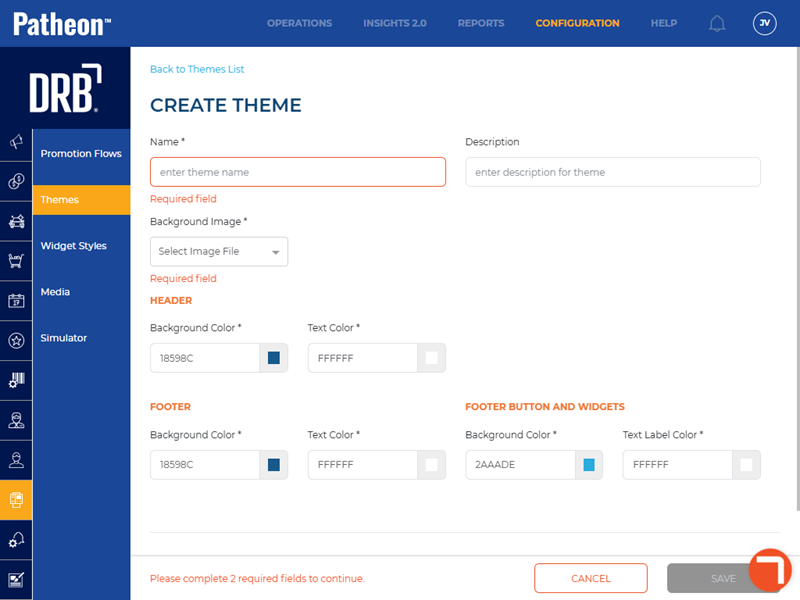
Name*
Name of the theme.
Description
A user-configured summary of the theme.
Background Image*
Image displayed in the background of the screen.
HEADER
The Header section provides the ability to configure a background color and text color. Color can be configured by manually entering a HEX code value, or using a color selection function.

Background Color*
Color of the header background. Select  to choose the desired color.
Text Color*
Color of the header text.
Footer
Background Color*
Color of the footer background. Select to choose the desired color.
Text Color*
Color of the footer text.
Footer Button and Widgets
Background Color*
Color of the footer button and widgets. Select to choose the desired color.
Text Color*
Color of the footer button and widgets text.
Status
A client can control whether its sites can use a theme by its Status setting.
Active
Status required to use a theme. Also required to assign the theme to a site.

Inactive
The theme can't be assigned to a site.

Search
Quickly locate a theme by entering all or any part of its Name. The results are displayed as matches are found.

Themes List
The themes list provides access to view or edit all the themes configured for an organization.

Name
The name of the theme.
Description
A user-configured summary of the workflow.
Status
Indicates whether the theme is active for the site.
Edit
Select the edit icon ( ) to open the corresponding workflow in the Edit theme panel, where the theme's settings are directly accessible