SERVICE DETAILS
The SERVICE DETAILS panel is used to configure new services, or edit existing services. It's displayed by selecting or edit ( ) from the Services panel.
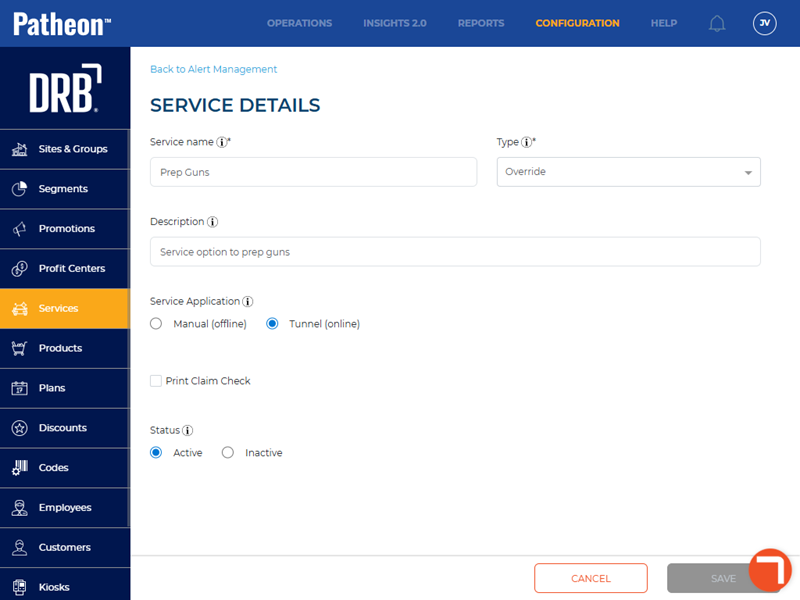
Service name*
Identifies the service. Services are available to all sites within an organization. For site-specific services, include the name or location of the site here. For example, if a fragrance service is the same for all sites, simply name it Fragrance. However, if it'll only be used at one site, indicate that by naming it something similar to Main St. Fragrance.
Max. 100 characters.
Type*
Select the service type:
- Override: A service that is sent directly to the tunnel controller to force a tunnel device on or off.
- Wash: A service performed by a device in the wash tunnel, it can be a wash or a la carte service.
- Interior: A service, such as a detail service, performed on the inside of a vehicle.
- Post-Wash: A service performed after a vehicle is washed, such as a wax or shine services; it can be applied manually or by a tunnel device.
- Instant Shine: A quick shine service, performed as part of the wash.
- Pre-Wash: A wash service, such as a pre-soak service.
Description
A brief summary of the service to make it easier to identify when assigning services to products.
Max. 200 characters.
Service Application
- Manual (offline): An offline service that is normally performed by a staff member.
- Tunnel (online): An online service that is normally sent to a tunnel controller and automatically performed.
Print Claim Check
When selected, a receipt is automatically printed by the point-of-sale system when an open sale with an eligible service is paid in full. It serves as proof that the customer has paid for the service and can use it to claim their vehicle.
Status
- Active: Required status for a service to be assigned to a product.
- Inactive: Indicates the site doesn't want to use this service. Can only be set if the service isn't assigned to any products (edit each product and remove it)