Plan Customer Detail Report
The Plan Customer Detail Report displays customer-specific wash plan data, including customer name, contact email, contact phone, join date, plan name, plan status, plan reload status, and number of plan uses for report period. It does not include wash plan revenue.
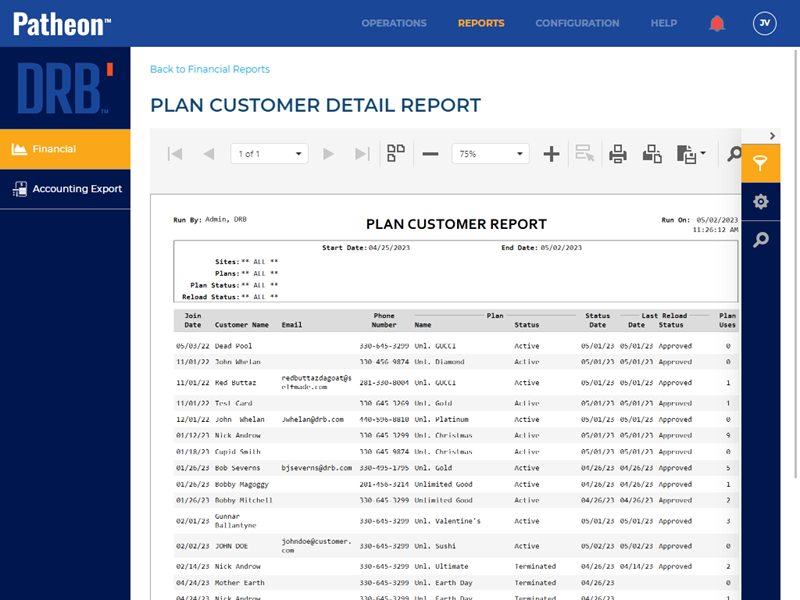
- Generate for single site or multiple sites
- Generate for single date or range of dates
- Export a generated report to CSV, HTML, PNG, MHT, PDF, RTF, TXT, XLS, XLSX, or DOCX
Report Parameters and Tools
The Plan Customer Detail Report parameters include the ability to specify start time, end time, site group(s), site(s), plan name(s), plan status(es), and plan reload status(es).
PREVIEW PARAMETERS
START TIME
The beginning date and time for the report. Select the calendar icon in the START TIME box to open a date and time modal.
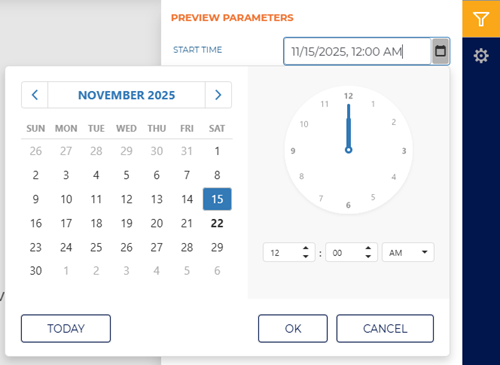
The default time for each day defaults to 12:00 AM, but can be changed to any hour and minute time.
Two shortcut functions are available for selecting and setting the date: a month/year selector and a today (current date) selector.
MONTH YEAR
The month and year above the calendar is a shortcut that changes the month view to a year view, from which any month in the year can be selected. Selecting a month that opens the month view so a specific day from that month can be selected.
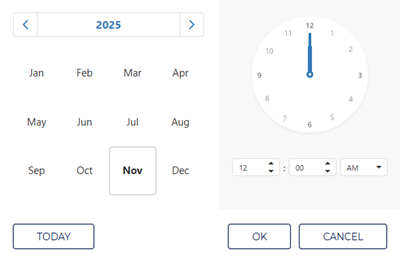
Selecting the year above the year view opens a decade view, from which any month in the decade can be selected. Selecting a year then opens the year view so a specific month from that year can be selected.
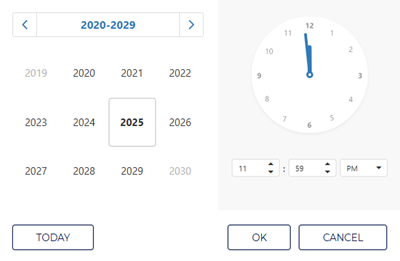
Selecting the decade above the decade view opens a century view, from which any decade in the century can be selected. Selecting a decade then opens the decade view so a specific year from that decade can be selected.
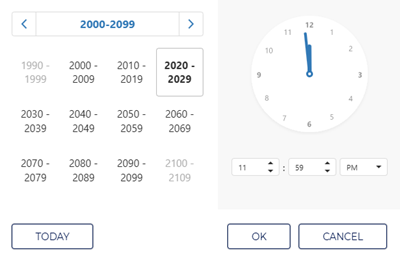
TODAY
Select the TODAY function to set the date and time to the current date and 11:59 PM.
END TIME
The ending date and time of the report. Select the date and time box to open a date and time modal.
Enter the same date as the START TIME to generate a report for a single day.
SITE GROUPS
The SITE GROUPS report parameter provides the ability to select a single site group, multiple select site groups, or all site groups to include for the report.
This setting includes all site groups (All selected) by default.
SITES
The SITES report parameter provides the ability to select a single site, multiple select sites, or all sites to include for the report.
This setting includes all sites (All selected) by default.
PLAN NAME
The PLAN NAME report parameter enables users to generate the report for all plans (the default), one specific plan, or multiple specific plans.
PLAN STATUS
The PLAN STATUS report parameter enables users to generate the report for all statuses (the default), one specific status, or multiple specific statuses.
There are 11 (eleven) status options.
- Select All
- Active
- Discontinued
- Discontinuing
- Expired
- Out of Units
- Reloading
- Suspended
- Suspending
- Terminated
- Unpaid
LAST RELOAD STATUS
The LAST RELOAD STATUS report parameter enables users to generate the report for all reload statuses (the default), one specific reload status, or multiple specific reload statuses.
There are 8 (eight) reload status options.
- Select All
- Approved
- Approved By Merchant
- Cancelled
- Declined
- Declined By Merchant
- Error
- Unknown
Report Header
The first page header of the report includes a Title, Report Generated, Generated By, Sites, Start Date, and End Date. If the report spans multiple pages, the header for all subsequent pages includes the Title, Report Generated, and Generated By.
Title
The title of the report is PlanCustomer Report.
Report Generated
The date on which the report was generated, in mm/dd/yyyy format.
Generated By
The employee who generated the report.
Sites
The site(s) for which the report was generated.
Start Date | End Date
The start date and end date for which the report was generated.
Report Data
The Plan Customer Detail Report data provides the following information for each plan member, for the generated report's parameters (site, date range, etc.): join date, name, email address, phone number, plan name and plan status, plan reload status information, and plan uses.

Join Date
The Join Date column provides the month, day, and year, in MM/DD/YY format, the customer purchased the plan.
Customer Name
The Customer Name column provides the name, in FirstName LastName format, of each plan member. For example, customer John Smith would be listed as John Smith.
Customer Email
The Customer Email column provides the email address, if one is available, for the corresponding customer.
Phone Number
The Phone Number column provides the phone number, if one is available, for the corresponding customer.
Plan
The Plan columns provide the name, status, and date of the plan, to which the corresponding customer belongs.
Name
The Name (Plan) column provides the name of the plan, to which the corresponding customer belongs.
Status
The Status (Plan) column provides the status of the plan, to which the corresponding customer belongs.
Date
The Date (Plan) column provides the date, in MM/DD/YY format, the corresponding customer last used the plan.
Last Reload
The Last Reload columns provide the plan renewal's status, plan renewal's response code, and plan renewal's response message recorded the last time the corresponding plan was submitted for renewal.
Status
The Status (Last Reload) column provides the status recorded the last time the corresponding plan was submitted for renewal.
Response Code
The Response Code (Last Reload) column provides the response code recorded the last time the corresponding plan was submitted for renewal.
Response Message
The Response Message (Last Reload) column provides the status recorded the last time the corresponding plan was submitted for renewal.
Plan Uses
The number of times the customer redeemed the plan for the generated report's time range and other report parameters.
Report Footer
Page numbers are provided at the bottom of each report in Page X of Y format.
