XPT Cash Audit Report
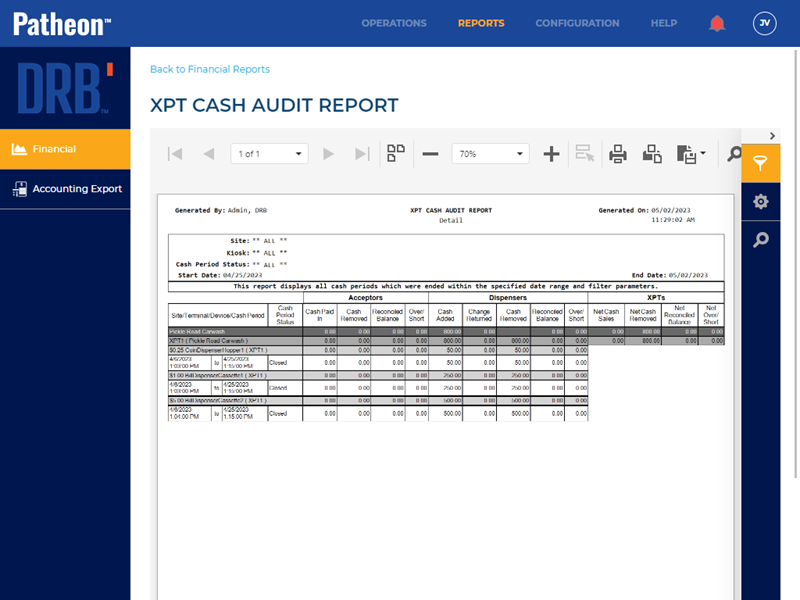
The XPT Cash Audit Report provides a way for sites to view and reconcile cash activity for kiosk terminals.
- Generate for a single site or multiple sites
- Generate for a single date or date range
- Export a generated report to CSV, HTML, PNG, MHT, PDF, RTF, TXT, XLS, XLSX, or DOCX
Report Parameters and Tools
The XPT Cash Audit Report tools include preview parameters (report time range, site groups, sites, terminal, details/summary, and cash period status), export options, and search. The preview parameters section opens by default when the XPT Cash Audit Report is selected from the list of financial reports, instructing, Waiting for parameter values...
PREVIEW PARAMETERS
The preview parameters section provides the ability to specify the start time, end time, site groups, sites, terminal, details/summary, and cash period status for a generated XPT Cash Audit Report.
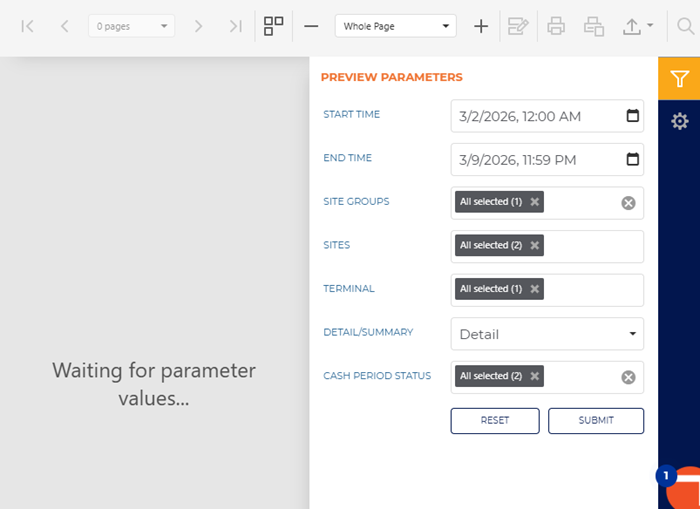
START TIME
The beginning date and time for the report. Select the calendar icon in the START TIME box to open a date and time modal.
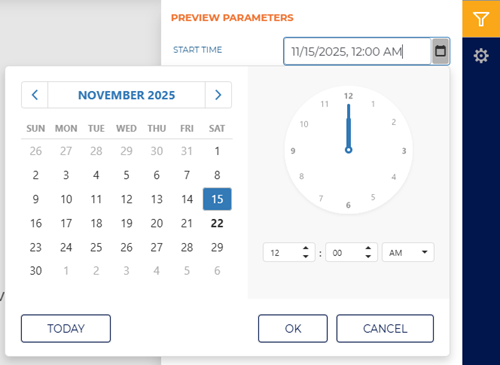
The default time for each day defaults to 12:00 AM, but can be changed to any hour and minute time.
Two shortcut functions are available for selecting and setting the date: a month/year selector and a today (current date) selector.
MONTH YEAR
The month and year above the calendar is a shortcut that changes the month view to a year view, from which any month in the year can be selected. Selecting a month that opens the month view so a specific day from that month can be selected.
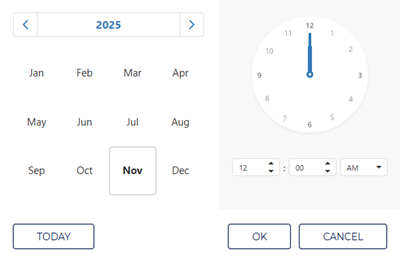
Selecting the year above the year view opens a decade view, from which any month in the decade can be selected. Selecting a year then opens the year view so a specific month from that year can be selected.
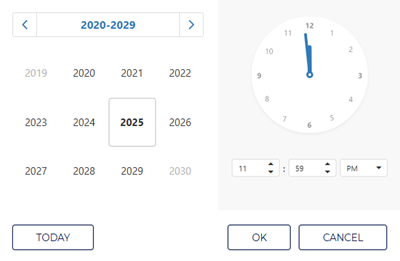
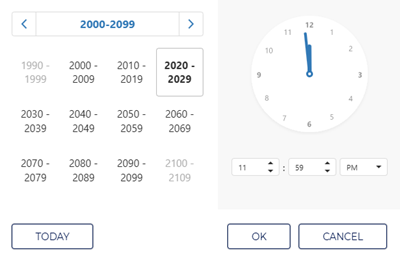
Selecting the decade above the decade view opens a century view, from which any decade in the century can be selected. Selecting a decade then opens the decade view so a specific year from that decade can be selected.
TODAY
Select the TODAY function to set the date and time to the current date and 11:59 PM.
END TIME
The ending date and time of the report. Select the date and time box to open a date and time modal.
Enter the same date as the START TIME to generate a report for a single day.
SITE GROUPS
Select the site groups box to open a drop-down list of site groups. Select a single site group, multiple select site groups, or all site groups to include for the report.
This setting includes all site groups (All selected) by default.
SITES
Select the site box to open a drop-down list of sites. Select a single site, multiple select sites, or all sites to include for the report.
This setting includes all sites (All selected) by default.
TERMINAL
Select the terminal box to open a drop-down list of terminals. Select a single terminal, multiple select terminals, or all terminals to include for the report.
This setting includes all terminals (All selected) by default.
DETAIL/SUMMARY
Select the amount of data to include on the report.
Summary
Select Summary to display summarized data for each section on the report.
- Cash periods: The report displays the cash period starting and cash period ending time stamps and the total number of cash periods covered.
- Acceptors: The report displays totals for cash paid in, cash removed, reconciled balance, and over/short for all acceptors combined.
- Dispensers: The report displays totals for cash added, change returned, cash removed, reconciled balance, and over/short for all dispensers combined.
- XPTs: The report displays net totals for cash sales, cash removed, reconciled balance, and over/short for all XPTs combined.
Detail
Select Detail to display the specific entries and totals that contribute to each section on the report.
- Cash periods: The report lists each cash period with its starting and ending time stamps and shows the per-period totals used to compute the overall number of periods.
- Acceptors: The report expands to show each acceptor's individual cash paid in, cash removed, reconciled balance, and over/short amounts.
- Dispensers: The report expands to show each dispenser's individual cash added, change returned, cash removed, reconciled balance, and over/short amounts.
- XPTs: The report expands to show each XPT's net cash sales, net cash removed, net reconciled balance, and net over/short.
CASH PERIOD STATUS
Select the cash period status box to open a drop-down list of cash period statuses. Select opened, closed, reconciled, or select all to include on the report.
RESET|SUBMIT
Use the function to return all preview parameters settings to their default settings. Use the function to generate the report for the preview parameters current settings.
EXPORT OPTIONS
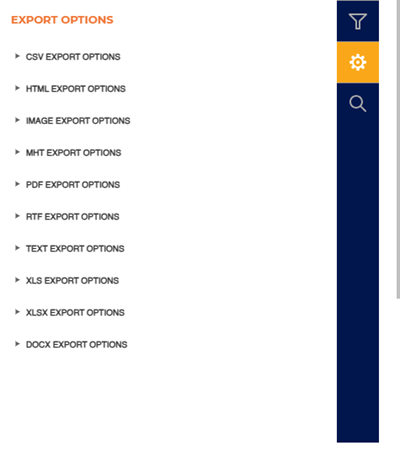
The Export Options section provides the ability to export a generated XPT Cash Audit Report to any of the following file formats:
- CSV
- HTML
- PNG
- MHT
- RTF
- TXT
- XLS
- XLSX
- DOCX
SEARCH
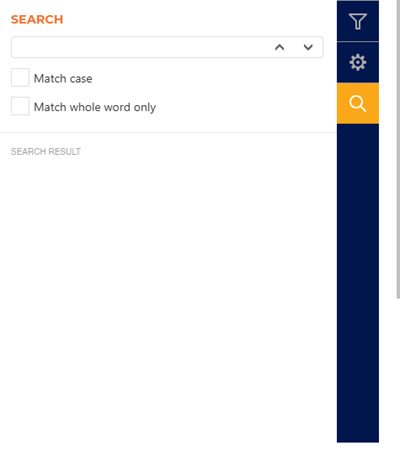
The Search section provides the ability to quickly locate a specific piece of text or data in the generated report.
Text Box
The text box provides a field to input the search criteria. Select Enter on a keyboard or use the provided ^ function or v function to invoke the search.
^ | v
Invoke the search function for the generated report, up or down.
Match case
Select the Match case option to only identify exact uppercase and/or lowercase matches in the results.
Match whole word only
Select the Match whole word only option to only identify exact text matches in the results.
Search Result
The Search Result area lists all search matches in the report. Each match identifies the page on which it is located, and the match is a link that can be selected to highlight its location on the generated report (in the report viewer).
Report Header
The first page header of the XPT Cash Audit Report includes a Title, Subtitle, Generated By, Generated On, Site, Kiosk, Cash Period Status, Start Time, and End Time. If the report spans multiple pages, the header for all subsequent pages includes the Title, Subtitle, and Generated On.

Title
The title of the report is XPT Cash Audit Report.
Subtitle
Below the title, a Summary or Detail subtitle is displayed.
Generated By
The employee who generated the report.
Generated On
The date and time which the report was generated, in mm/dd/yyyy and hh:mm:ss format.
Site
The site(s) for which the report was generated.
Kiosk
The kiosk(s) for which the report was generated.
Cash Period Status
The cash period status for which the report was generated.
Start Time
The start date and time for which the report was generated.
End Time
The end date and time for which the report was generated.
Report Data
The XPT Cash Audit Report data consists of cash period starting and ending time stamps and number of cash periods, acceptor totals (cash paid in, cash removed, reconciled balance, over/short), dispenser totals (cash added, change returned, cash removed, reconciled balance, over/short), and XPT net totals (net cash sales, net cash removed, net reconciled balance, net over/short).
Closed Cash Periods
Section heading. Displays historical cash activity for the selected date range, including cash paid in, removed, added, change returned, net cash sales, and reconciled balances for cash periods that have been finalized. Since they are closed, the cash activity for the selected date range are considered ended and ready for reconciliation review.
Cash Period Starting
The start date and time for each cash reporting period.
Cash Period Ending
The end date and time for each cash reporting period.
# of Cash Periods
The total number of those periods covered by the XPT Cash Audit Report.
Client/Site
The site(s) for which the report was generated.
Acceptors
Displays the cash paid in, cash removed, reconciled balance, and over/short for acceptors.
Cash Paid In
The total amount of cash collected by acceptor devices during the cash period, representing all cash tendered into the system before any removals or reconciliations.
Cash Removed
The total amount of cash physically taken out of the acceptor during the cash period, reflecting removals for deposits, vaulting, or reconciliation.
Reconciled Balance
The closing cash amount for acceptors after account for cash paid in, cash removed, and any adjustments, representing the expected on-hand cash per reconciliation.
Over/Short
The difference between the actual counted cash and the reconciled balance for acceptors, indicating a surplus (over) or deficit (short) that may require investigation.
Dispensers
Displays the cash added, change returned, cash removed, reconciled balance, and over/short for dispensers.
Cash Added
The total amount of cash loaded into dispensers during the cash period to provide change or maintain operation, increasing the dispenser's available cash.
Change Returned
The total amount of cash dispensed as change by the dispenser during the cash period, reducing the dispenser's available cash.
Cash Removed
The total amount of cash taken out of dispenser devices during the cash period (for pickups, deposits, or transfers), reducing the dispenser's available cash.
Reconciled Balance
The closing cash amount for dispensers after accounting for cash added, change returned, cash removed, and any adjustments, representing the expected on-hand cash per reconciliation.
Over/Short
The difference between the actual counted cash and the reconciled balance for dispensers, indicating a surplus (over) or deficit (short) that may require investigation.
XPTs
Displays the net cash sales, net cash removed, net reconciled balance, and net over/short for XPTs.
Net Cash Sales
The total cash revenue collected by XPT devices during the cash period, net of refunds, voids, and other sales adjustments.
Net Cash Removed
The total cash withdrawn from XPT devices during the cash period, net of returns and adjustments, representing amounts removed for deposits, transfers, or reconciliation.
Net Reconciled Balance
The closing net cash amount for XPT devices after accounting for net cash sales, net cash removed, and any adjustments, representing the expected on-hand cash per reconciliation.
Net Over/Short
The difference between the actual counted net cash across XPT devices and the net reconciled balance, indicating a net surplus (over) or deficit (short) that may require investigation.
Open Cash Periods
Section heading. This section uses the same column layout described under Closed Cash Periods; however, values may continue to change until the cash period is closed.
Report Footer
Page numbers are provided at the bottom of the report.
