ACTIVE SALES
The Active Sales panel provides quick access to all sales that need tendered or added to a service queue. Use it to recall and complete a sale that you had to step away from, or to review and clean up abandoned sales from the system.
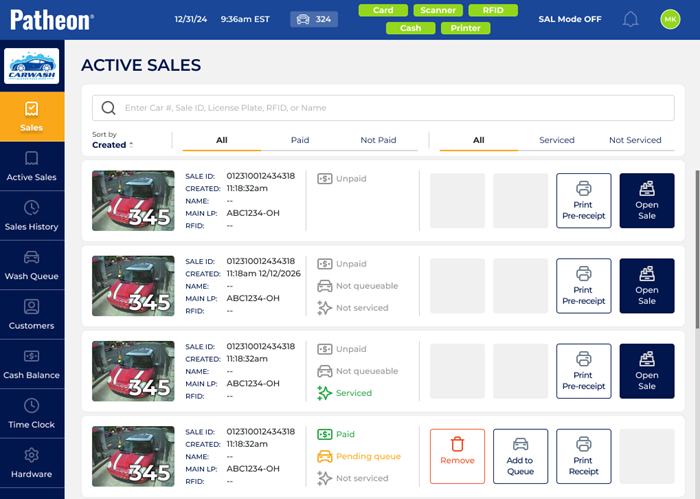
Sale List
The sale list section displays all active sales.
Search
Staff can search by car number, sale ID, license plate, or customer name.

List
The number of sales that appear in the list.
Queue
Active sales that have at least one service include an Add to Queue function in the list. Use this to insert the corresponding sale in the service queue.
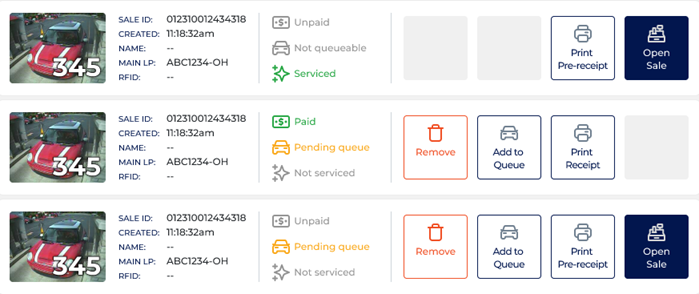
Selecting the function immediately inserts the sale at the end of the service queue; no warning or confirmation dialog is displayed. The Add to Queue function is then removed for that sale and replaced with Added to wash queue text.
Open
The Open Sale function immediately opens the corresponding sale in the Sales panel; there is no verification dialog.
Remove
The Remove function immediately deletes the corresponding sale from the system; no warning or confirmation prompt is displayed.
Print Pre-receipt
The Print Pre-receipt function immediately prints one copy of the pre-receipt for the corresponding active sale. Use it to provide the customer with a printed summary of the sale before payment is complete. No warning or confirmation dialog is displayed.
Print Receipt
The Print Receipt function immediately prints one copy of the sale receipt when the sale is paid or a pre-sale receipt when the sale is unpaid. The function is not available if the sale is paid and the vehicle is queued for the wash.