BILL ACCEPTOR
The Bill Acceptor diagnostics panel, accessible from the Diagnostics panel, provides status information about the kiosk's bill acceptor. It includes functions to enable or disable the acceptor, and stack or return test bills.
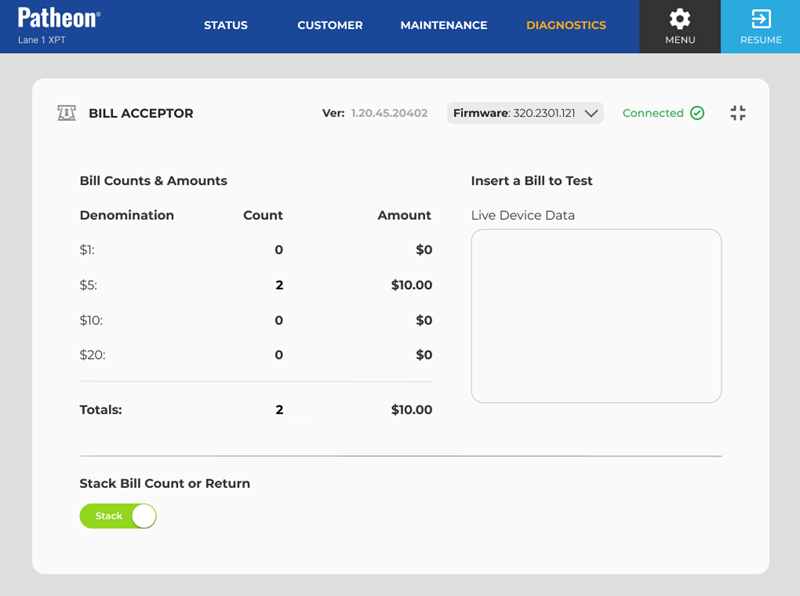
Ver
Identifies the specific version of the software currently installed and running.
Firmware
Identifies the version of the bill acceptor software driver installed at this kiosk.
Status
Identifies the current state of the kiosk's bill acceptor. The status color indicates the status type: Normal, Warning, or Critical (Out of Service).
- Connected: The bill acceptor is enabled, online, and communicating successfully with Patheon. The device is available for transactions and is expected to to accept bills normally.
- Degraded: The bill acceptor is enabled and online, but it is operating with reduced performance or has reported a condition that may require attention. Transactions may still be available, but bill acceptance may be slower, less reliable, or at risk of failing. See below for more information.
- Disconnected: The bill acceptor can't connect to Patheon and is out of service. Because the system can't confirm the device's current state or send or receive bill acceptance information, bill acceptance is unavailable until connectivity is restored. See below for more information.
- Error: The bill acceptor encountered a critical error that has placed it out of service. The device can't accept bills until the error is cleared or the underlying issue is resolved. See below for more information.
- Offline: The bill acceptor is offline and out of service. The device is not currently available for transactions and can't accept bills. See below for more information.
Degraded
A Degraded status may occur when the device detects conditions such as a full cash box, bill path obstruction, sensor warning, cassette or stacker issue, or another non-critical condition. If the issue is not resolved, the bill acceptor may eventually become unavailable or move to an out-of-service status.
Disconnected
A Disconnected status may indicate a network issue, device communication failure, disconnected cable, powered-off component, or another condition preventing communication with Patheon.
Error
An Error status may be caused by a hardware fault, bill jam, full stacker or cash box, sensor issue, failed validation event, or another condition that prevents normal operation. Additional troubleshooting or service may be required.
Offline
An Offline status may occur when the bill acceptor is powered down, disabled, not detected by the kiosk, or otherwise unavailable to the system. The device must be brought back online before bill acceptance can resume.
Bill Counts & Amounts
The current number of each bill and its total amount held by the bill acceptor.
Denomination
The monetary value of a bill that the bill acceptor can recognize and process.
Count + Amount
The total number of each denomination of bill inserted into the bill acceptor while it was in test mode. These counts are reset if the bill acceptor is disabled or the Bill Acceptor screen is exited.
- $1
- $5
- $10
- $20
- Totals
Live Device Data
The real-time status and activity from the bill acceptor.
Stack Bill Count or Return
Toggle how a test bill is handled after it's inserted.
- Stack: Keep the test bill in the bill acceptor.
- Return: Eject the test bill from the bill acceptor after it is inserted.
This function is only available for staff with vault access. Without vault access, staff can't retrieve stacked bills.