RECEIPT PRINTER
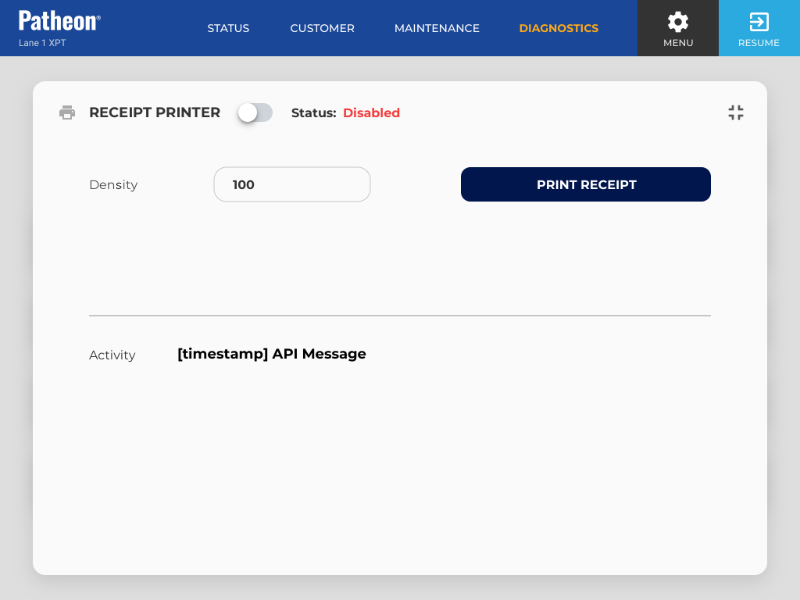
The Receipt Printer diagnostics panel, accessible from the Diagnostics panel, provides status information about the kiosk's receipt printer and activity. It includes a function to print a test receipt.
App Ver
Identifies the specific version of the application currently installed and running.
Firmware
Identifies the version of the device's embedded software currently installed and running.
Status
Identifies the current state of the kiosk's receipt printer. The status color indicates the status type: Normal, Warning, or Critical (Out of Service).
- Connected: The receipt printer is enabled, online, and communicating successfully with Patheon. The printer is available for transactions and should print receipts normally.
- Degraded: The receipt printer is enabled and online, but it is operating with reduced performance or has reported a condition that may require attention. Receipts may still print, but printing may be slower, less reliable, or at risk of failing. See below for more information.
- Disconnected: The receipt printer can't connect to Patheon and is out of service. Because the system can't communicate with the printer or confirm its current state, receipt printing is unavailable until connectivity is restored. See below for more information.
- Error: The receipt printer has encountered a critical error has been placed out of service. Receipt printing is unavailable until the error is cleared or the underlying issue is resolved. See below for more information.
- Offline: The receipt printer is offline and out of service. The printer is not currently available to the kiosk and can't print receipts. See below for more information.
Degraded
A Degraded status may occur when the printer detects conditions such as low paper, paper nearing depletion, print quality issues, communication delays, a cover or paper-feed warning, or another non-critical issue. If the condition is not resolved, the receipt printer may eventually become unavailable or move to an offline status.
Disconnected
A Disconnected status may indicate a network issue, device communication failure, disconnected cable, powered-off component, or another condition preventing communication with Patheon.
Error
An Error status may be caused by a paper jam, empty paper roll, printer cover issue, cutter failure, hardware fault, device initialization failure, or another condition that prevents normal operation. Additional troubleshooting or service may be required.
Offline
An Offline status may occur when the printer is powered down, disabled, not detected by the kiosk, or otherwise unavailable to the system. The printer must be brought back online before receipt printing can resume.
PRINT RECEIPT
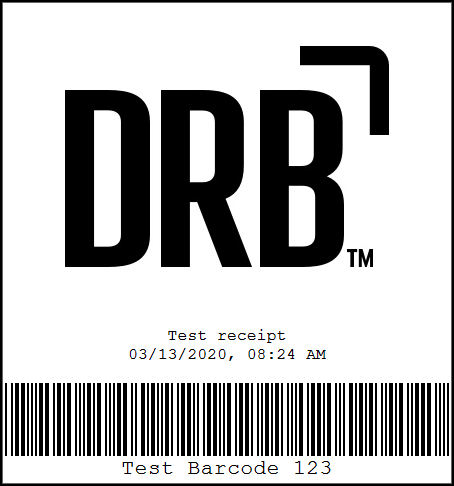
Select to print a test receipt. The test receipt includes:
- DRB logo
- Test receipt text
- mm/dd/yyyy, HH:MM AM/PM timestamp
- Barcode example
- Test Barcode 123 text
Activity
Displays the most recent data sent to be printed. This information is replaced each time a test receipt is printed, or upon exiting the Receipt Printer diagnostic panel.