Wash Queue

Efficient wash queue management is critical to maintaining smooth operations, minimizing customer wait times, and maximizing throughput during peak business hours. Patheon’s wash queue feature provides both automation and flexibility, allowing operators to tailor vehicle processing to your specific operational needs. Its wash queue management feature provides pictures of each queued car at the tunnel entrance terminal, cashier terminals, tablet terminals, and back office terminals, bringing real-time visibility and control to the wash queue. Whether operators prefer fully automated vehicle queuing or want to manually manage vehicles before they enter the wash queue, Patheon supports your workflow. Capabilities like vehicle numbering and an informational Wash Queue panel empower your team to quickly identify, track, and process vehicles, improving accuracy and customer satisfaction.
- Vehicle Auto-Queuing: When enabled, it automatically adds vehicles to the wash queue in the order they are recorded for seamless processing without manual intervention. Sites can even disable/enable auto-queuing from a terminal when they need to.
- Unqueued Vehicle Management: When auto-queuing is disabled, washes are added to an unqueued list, allowing staff to manually add vehicles, at any position, to the wash queue.
- 3-Digit Vehicle Numbering: All vehicles are assigned a unique 3-digit number for easy identification and tracking within the wash queue.
- Informational Wash Queue Panel: Provides real-time updates on wash positions, vehicle identifiers, customer name, queue status, retracts, and even kiosk terminal screens, without needing to switch screens.
- Previous + Current Vehicle Picture Comparison: Quickly and easily verify that pass plans are being used by the same vehicle.
- Service Badges: See what services are needed for prepping or the names of unlimited plan members.
- Prep + Wait Time: Keep an eye on how long each vehicle has been waiting to be washed.
FAQs
- What happens when vehicle auto-queuing is enabled?What happens when vehicle auto-queuing is enabled?
When vehicle auto-queing is enabled, a vehicle associated with any prepaid wash, paid wash, or plan redemption wash is automatically added to the wash queue, allowing for continuous, hands-free vehicle processing.
For new plan sales, the vehicle is added to the wash queue if the function is enabled; if the function is disabled, the vehicle is added to the unqueued list.
- What happens when vehicle auto-queuing is disabled?What happens when vehicle auto-queuing is disabled?
When vehicle auto-queuing is disabled, all vehicles are added to the unqueued list; no vehicles are automatically added to the wash queue. Staff must then select each vehicle from the unqueued list and add it to the wash queue.
Note that staff can insert a vehicle into any position in the wash queue, or simply send the vehicle to the tunnel controller (wash queue position 1) directly from the unqueued list.
- How are vehicles added to unqueued vehicles list?How are vehicles added to unqueued vehicles list?
Vehicles can be manually removed from the wash queue by staff. In addition, if auto-queuing is disabled, a vehicle will be automatically added to the unqueued vehicles list, and must then be manually added to the wash queue.
Tunnel Entrance Terminal: Removing a vehicle from the wash queue, on the Wash Queue panel at a tunnel entrance terminal, will move that vehicle to the unqueued vehicle list.
Cashier Terminal: A vehicle will be automatically added to the unqueued vehicles list if auto-queuing is disabled, but the function is enabled.
Back Office Cashier Terminal: A vehicle will be automatically added to the unqueued vehicles list if auto-queuing is disabled, but the function is enabled.
Tablet Terminal: A vehicle will be automatically added to the unqueued vehicles list if auto-queuing is disabled, but the function is enabled.
- How are vehicles added to the wash queue?How are vehicles added to the wash queue?
Vehicles can be added to the wash queue automatically by the system, if auto-queuing is enabled, or manually by staff.
Tunnel Entrance Terminal: A vehicle can be manually selected from the unqueued list and inserted in the wash queue, at any position.
Back Office Cashier Terminal: Sell a plan and set to the function to enabled (when vehicle auto-queuing is enabled).
Cashier Terminal: Sell a wash, redeem a prepaid wash, redeem a plan wash, or sell a plan and set the function to enabled (when vehicle auto-queuing is enabled).
Kiosk Terminal: Sell a wash, redeem a prepaid wash, redeem a plan wash, or sell a plan (when vehicle auto-queuing is enabled).
Tablet Terminal: A vehicle can be manually selected from the unqueued list and inserted in the wash queue, at any position. Sell a plan and set the function to enabled (when vehicle auto-queuing is enabled).
- In what scenarios are vehicles never added to the wash queue and unqueued list?In what scenarios are vehicles never added to the wash queue and unqueued list?
There are several scenarios where vehicles are not added to the wash queue and unqueued list.
Back Office Cashier Terminal: A vehicle will not be added to the wash queue or unqueued list when a new wash plan is sold from a back office cashier terminal if the function is disabled.
Cashier Terminal: A vehicle will not be added to the wash queue or unqueued list when a new wash plan is sold from a cashier terminal if the function is disabled.
Tablet Terminal: A vehicle will not be added to the wash queue or unqueued list when a new wash plan is sold from a tablet terminal if the function is disabled.
Tunnel Entrance Terminal: A vehicle will not be added to the wash queue or unqueued list when a new wash plan is sold from a tunnel entrance terminal if the function is disabled.
- Can staff manage the wash queue from both tablets and cashier terminals?Can staff manage the wash queue from both tablets and cashier terminals?
Yes, the Wash Queue panel is available at both device types, providing flexibility for a site's staff.
- How does vehicle numbering improve queue management?How does vehicle numbering improve queue management?
Vehicle numbering allows each car to be uniquely identified and tracked, simplifying the process of locating and selecting vehicles in the wash queue and unqued list.
- Can staff view which vehicle is in which position without toggling screens?Can staff view which vehicle is in which position without toggling screens?
Yes, the Wash Queue panel displays detailed information such as vehicle identifiers and queue positions directly, making management more efficient.
- Is there a way to manage unqueued vehicles at the end of the business day?Is there a way to manage unqueued vehicles at the end of the business day?
Yes, Patheon provides a method for clearing any leftover unqueued vehicles, without losing a record of the transaction, that are still on the unqueued list.
- How are unqueued vehicles removed from the unqueued list?How are unqueued vehicles removed from the unqueued list?
Unqueued vehicles are removed from the unqueued list according to the sale terminal from which it's performed.
Tunnel Entrance Terminal: Unqueued vehicles can be removed from the Wash Queue panel.
Cashier Terminal, Tablet Terminal, and Back Office Staff: Unqueued vehicles can be removed, one at a time, from the Active Sales panel, by selecting the function.
Visual Wash Queue with Enhanced Information
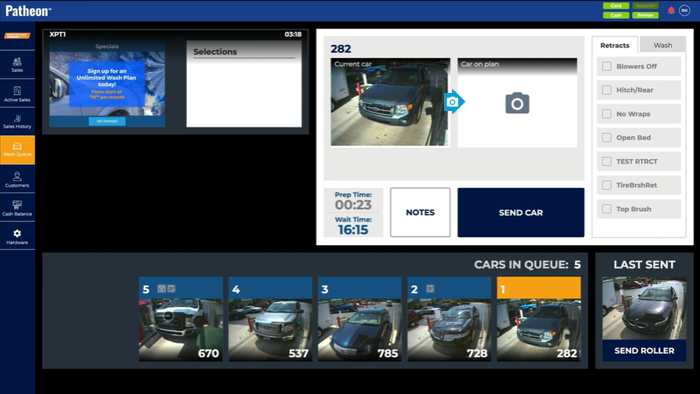
The Wash Queue panel provides detailed and accessible information. Operators can now see which wash is in which position, vehicle identifiers, retracts, and other key data directly on the screen without needing to toggle between different panels or views. improving workflow efficiency by giving staff instant access to critical queue information, enabling faster decision-making and smoother vehicle processing. By reducing the time spent navigating the system, employees can focus more on operational tasks, which can increase throughput and reduce bottlenecks. This streamlined interface can also shorten training times for new employees and reduce errors, contributing to cost savings and better overall performance.
Vehicle Auto-Queuing
The vehicle auto-queuing capability allows car wash operators to automatically place vehicles directly into the wash queue as soon as the sale is recorded. This is controlled via an auto-queue function, which can be toggled on or off depending on operational preferences. When enabled, the system streamlines vehicle processing by removing the need for manual intervention to queue vehicles, helping maintain a steady flow through the wash line. Automating the queue reduces human error and delays associated with manual vehicle entry, enabling faster throughput and reducing wait times for customers. With quicker vehicle processing, operators can serve more vehicles per hour, potentially increasing revenue. Additionally, automation can reduce labor costs by minimizing the staff time needed to manage the queue.
3-Digit Vehicle Numbering
The 3-digit vehicle numbering system assigns a unique identifier to each vehicle entering either the wash queue or the unqueued list. This numbering makes it easier for staff to track and locate vehicles throughout the wash process, especially in busy environments where multiple vehicles are processed simultaneously. It also helps when vehicles enter from terminals without gates, ensuring accurate identification without physical barriers.
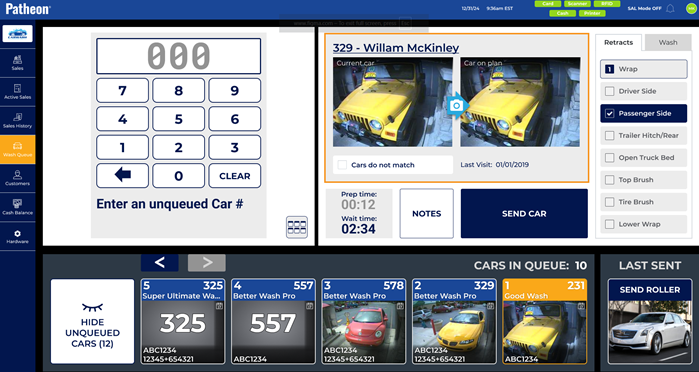
This capability enhances operational clarity and reduces confusion, which can be a common challenge in busy car washes. By quickly identifying vehicles, staff can expedite processing, reduce wait times, and minimize errors such as washing the wrong vehicle or losing track of prepaid sales. Improved accuracy helps maintain customer satisfaction and reduces costly mistakes. Efficient vehicle tracking can also lead to better resource allocation, reducing wasted labor and operational costs.
Unqueued Vehicle List
The unqueued vehicles list helps improve operational control and accuracy, directly from the Wash Queue panel. It allows staff to manage peak times more effectively by prioritizing certain vehicles or addressing customer-specific needs before queuing. This can reduce congestion and errors, leading to smoother operations. From a cost perspective, it minimizes lost washes by ensuring no vehicle is overlooked. When the auto-queue function is disabled, vehicles aren't added to the wash queue; instead, they're placed in the unqueued list, which is accessible from the Wash Queue panel via the function.

The unqueued vehicles list acts as a holding area where sales can be reviewed, either by vehicle tile or 3-digit vehicle number, and then manually added to the wash queue. This capability provides flexibility for car wash operators who may want to control the timing or order in which vehicles enter the wash, enabling better handling of special cases or irregular workflows.
Select by 3-Digit Vehicle Number
When the unqueued vehicle list opens, the 3-digit vehicle number dialog opens. Enter the vehicle number here to selected it.
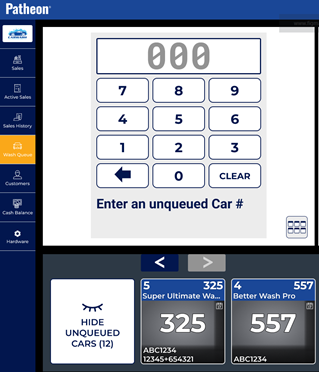
Alternatively, use the vehicle tile function to view tiles for all vehicles in the unqueued list.
Select by Vehicle Tile
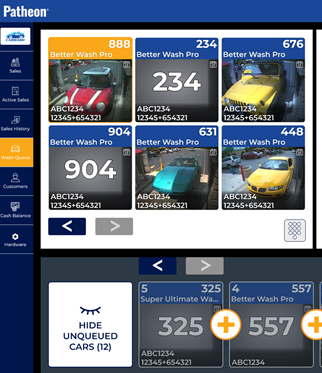
With the function selected, use the tile/vehicle number toggle to view the unqueued list as vehicle tiles. Navigation functions are available to view all vehicles if there are more than 6 in the list.
End-of-Day Unqueued Vehicle Management
Patheon's unqueued vehicle list also includes tools to manage and clear any unqueued cars remaining at the end of the day. As part of a site's close-of-business activities, each vehicle in the unqueued list can be removed, while a record of the transaction is retained. This ensures that all sales are accounted for and that no vehicles remain unserviced, maintaining accurate reporting, preventing revenue leakage caused by lost or forgotten sales. Maintaining clean data and operational discipline can improve decision-making and help optimize future staffing and resource planning, ultimately reducing costs and maximizing profitability.
Cross-Platform Access (Tablet and Office Terminals)
The auto-queue function and wash queue management features are available on both tablet terminals and office terminals, providing flexibility in how staff interact with the queue system. This allows different team members to manage the queue from various points within the car wash facility, adapting to different workflows and staffing models. Having cross-platform access enhances operational flexibility and resilience. For example, if a tablet terminal is unavailable or in use elsewhere, queue management can continue uninterrupted from an office terminal. This reduces downtime and helps maintain continuous service, which is crucial for customer satisfaction and revenue optimization. It also allows for better staff coordination and can improve labor efficiency by distributing management tasks where they are most needed.