Reconcile Store and Forward Sales
The information below describes where to view, and how to understand, sales recorded when store-and-forward offline acceptance was active.
General Sales Report
Store and forward reconciliation can be performed with the General Sales Report.
ASSET
The ASSET section of the General Sales Report contains two metrics that relate to store and forward transactions.
CC Payment > Unknown
Provides the total number of transactions that have been approved, along with the total dollar value.
S&F Receivable
Provides the total number of transactions in store and forward, along with the total dollar value.
Important: An Amount value of $0.00 for the S&F Receivable (in the ASSET section) means that all sales recorded for store-and-forward have been forwarded to the processor.
EXPENSE
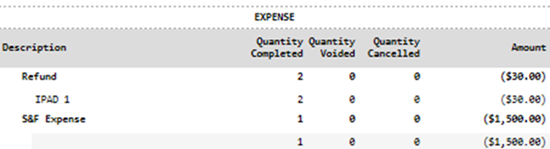
The EXPENSE section of the General Sales Report contains one metric that relates to store and forward transactions.
S&F Expense
Provides the total number of transactions that failed to store and forward, along with the total dollar value.
Steps
- Generate the General Sales Report.
- Navigate to the ASSET section.
- View the S&F Receivable row's Quantity Completed value to identify whether, and how many, sales were recorded while store and forward was active.
- View the S&F Receivable row's Amount value to determine if any sale amounts still need to be forwarded to the card processor for processing. Note: If the value is $0.00, all stored sales have been submitted for processing.
- View the CC Payment > Unknown row (under the ASSET section) for the quantity of store-and-forward sales and total amount that was forwarded and approved by the card processor.
- Navigate to the EXPENSE section.
- View the S&F Expense row for the total number of transactions that failed to store and forward, including the total dollar value.
Examples
This section contains three different examples of the General Sales Report for sales that were recorded while store-and-forward was active.
Stored, but not Forwarded
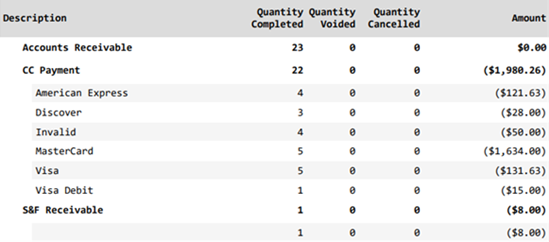
In the example report below, the S&F Receivable row contains 1 transaction recorded (Quantity Completed) for store-and-forward. The corresponding ($8.00) (Amount) for the S&F Receivable row indicates that the amount hasn't been forwarded yet.
Stored, Forwarded, and Approved
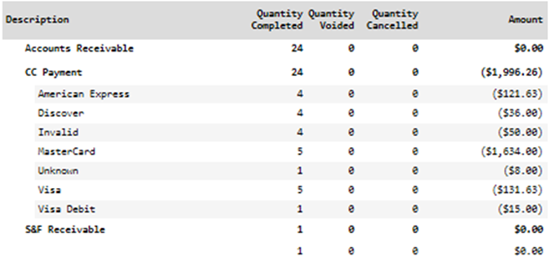
In the example report below, the S&F Receivable row contains 1 transaction recorded (Quantity Completed) for store-and-forward. The corresponding $0.00 (Amount) for the S&F Receivable row indicates that the sale was successfully forwarded for processing. Note that this doesn't mean it was subsequently approved. Instead, examine the Unknown row (under CC Payment), which is now present and note the ($8.00) (Amount) recorded for it. This value is the amount that was recorded during store-and-forward, submitted and approved by the processor.
Stored, Forwarded, and Declined
In the example report below, under the ASSET section, 2 transactions were recorded while store and forward was active (S&F Receivable has 2 recorded for Quantity Completed). Note that Amount is $0.00, which means that both sales were successfully forwarded to the processor, and there are no more stored sales that need to be forwarded to the processor.

Now review the CC Payment > Unknown row. Note that only 1 sale is recorded (Quantity Completed), for ($8.00) (Amount). This means that the processor approved only one sale, so the other sale was declined.
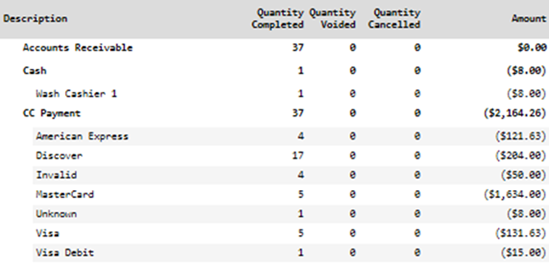
To view the declined sale, navigate to the EXPENSE section (located after the ASSET section). Note that the S&F Expense row includes 1 sale (Quantity Completed), with an Amount of ($1,500.00). This means that 1 sale for $1,500.00 was forwarded to the processor and then declined.