House Account Activity Report
The house account activity Report displays detailed charge and credit activity posted to house accounts for a specified date or range of dates. It lists each sale/transaction and its components so you can see both individual line-item activity and the net effect on a member's account. Use this report to reconcile posted house account charges and credits with member statements or the general ledger, verify totals by transaction and by member, identify outstanding balances, disputed or unusual credits/discounts, and missed or duplicate payments, and audit pricing, tax, and charge application for compliance and error correction.
- Generate for single site, site group, multiple select sites, or all sites
- Generate for single date or range of dates
- Export a generated report to CSV, HTML, PNG, MHT, PDF, RTF, TXT, XLS, XLSX, or DOCX
All Patheon Portal paginated financial reports include a set of functions to navigate report pages, resize the report view, print the report, and export the report. See Financial Report Viewer Tools for detailed information about each tool.
Report Parameters and Tools
The House Account Activity Report tools include Preview Parameters (report time range and account), Export Options, and Search. The Preview Parameters section opens by default when the House Account Activity Report is selected from the list of financial reports, instructing, Waiting for parameter values....
PREVIEW PARAMETERS
The Preview Parameters section provides the ability to specify the start time, end time, and account for a generated House Account Activity Report.
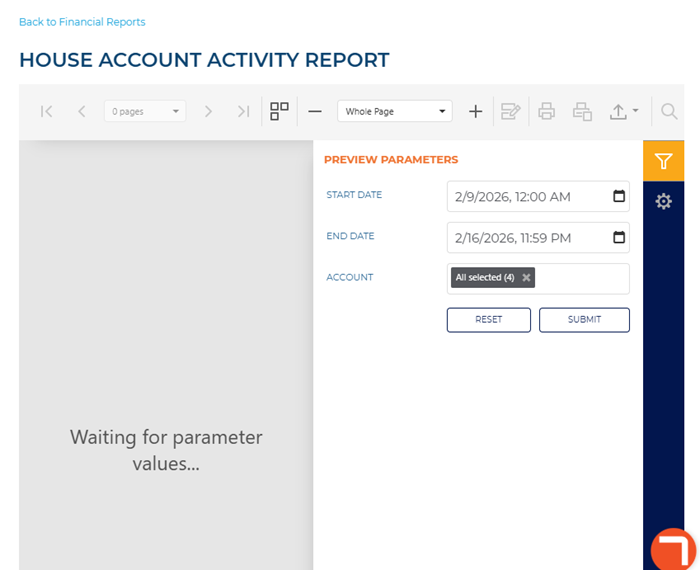
START DATE
The beginning date and time for the report. Select the calendar icon in the START TIME box to open a START TIME dialog.
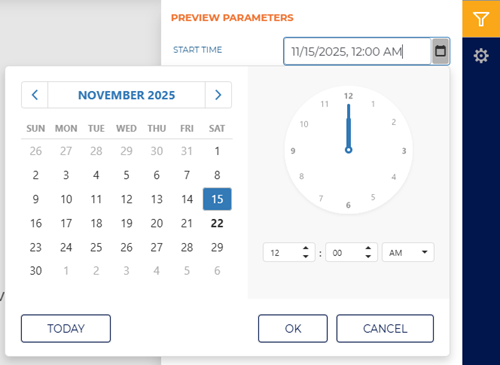
The default time for each day defaults to 12:00 AM, but can be changed to any hour and minute time.
Two shortcut functions are available for selecting and setting the date: a month/year selector and a today (current date) selector.
MONTH YEAR
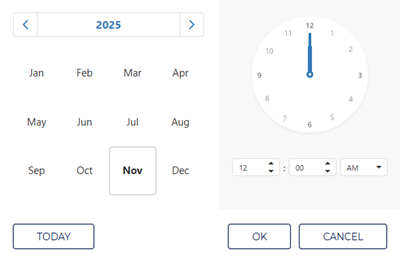
The month and year above the calendar is a shortcut that changes the month view to a year view, from which any month in the year can be selected. Selecting a month then opens the month view so a specific day from that month can be selected.
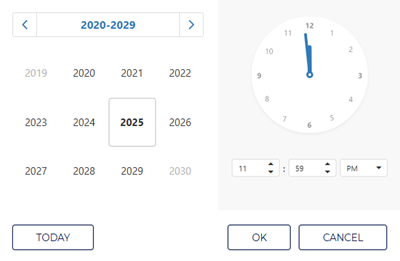
Selecting the year above the year view opens a decade view, from which any month in the decade can be selected. Selecting a year then opens the year view so a specific month from that year can be selected.
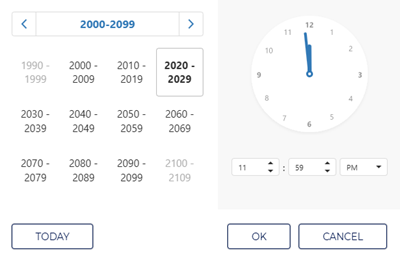
Selecting the decade above the decade view opens a century view, from which any decade in the century can be selected. Selecting a decade then opens the decade view so a specific year from that decade can be selected.
TODAY
Select the function to set the date and time to the current date and 11:59 PM.
END DATE
The ending date and time of the report. Select the date and time box to open a date and time dialog.
Enter the same date as the START DATE to generate a report for a single day.
ACCOUNT
Select the account box to open a drop-down list of house accounts. Select a single account, multiple accounts, or all accounts to include for the report.
This setting includes all accounts (All selected) by default.
|
Use the function to return all Preview Parameters settings to their default settings. Use the function to generate the report for the Preview Parameters current settings.
EXPORT OPTIONS
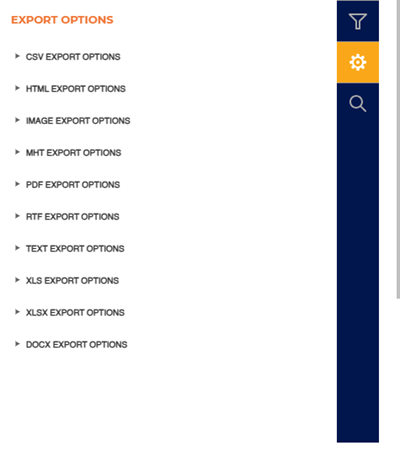
The Export Options section provides the ability to export a generated Bank Deposit Report to any of the following file formats:
- CSV
- HTML
- PNG
- MHT
- RTF
- TXT
- XLS
- XLSX
- DOCX
Report Header
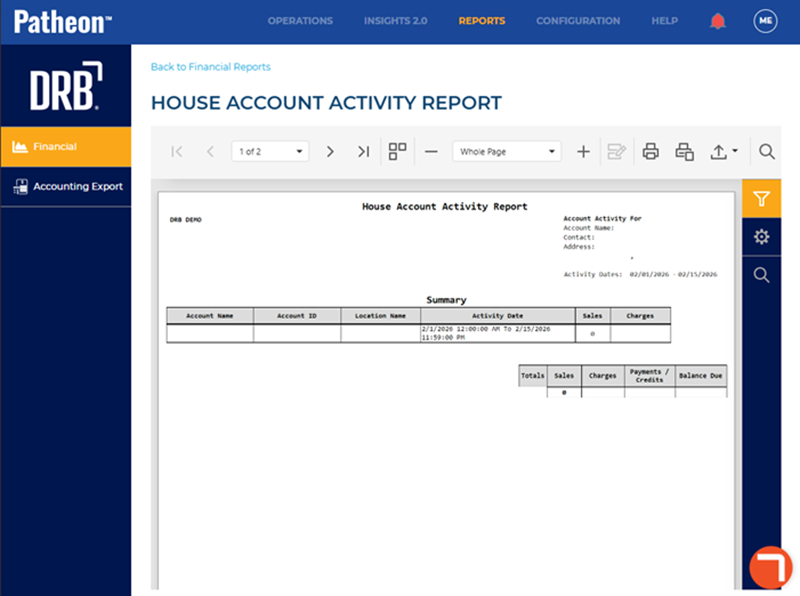
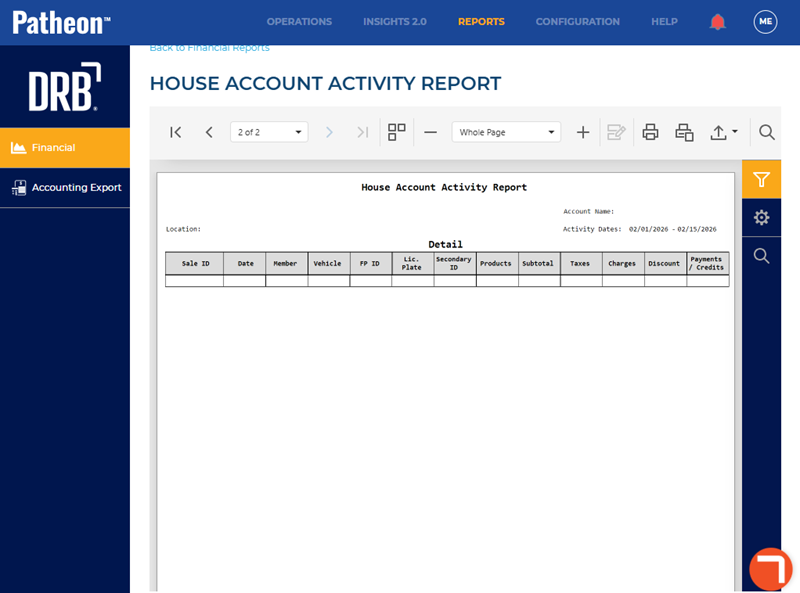
The first page header of the report includes a Title, Location, Account Activity For Account Name, Contact, Address, and Activity Dates. If the report spans multiple pages, the header for all subsequent pages includes the Title, Location, Account Name, and Activity Dates.

Location
The site where the report was generated.
HOUSE ACCOUNT ACTIVITY REPORT
The title of the report is House Account Activity Report.
Account Activity For Account Name
The account(s) for which the report was generated.
Contact
The name of the house account contact.
Address
The company's address for the house account.
Activity Dates
The dates for which the report was generated.
Report Summary
The House Account Activity Report summary consists of the number of sales, charges, payments/credits, and balance due.

Account Name
The name of the account for which the report was generated.
Account ID
The ID number of the account for which the report was generated.
Location Name
The name of the location from where the report was generated.
Activity Date
The date(s) and time(s) of the account activity for which the report was generated.
Sales
The total number of sales for the activity date(s) for which the report was generated.
Charges
The total amount of charges for the activity date(s) for which the report was generated.
Total Sales
The total number of sales for the activity date(s) for which the report was generated.
Total Charges
The total amount of charges for the activity date(s) for which the report was generated.
Total Payments/Credits
The total amount of payments and/or credits for the activity date(s) for which the report was generated.
Total Balance Due
The total amount due for the activity date(s) for which the report was generated.
Report Data
The House Account Activity Report data consists of products sold, subtotal, taxes, charges, discounts, and payments/credits.
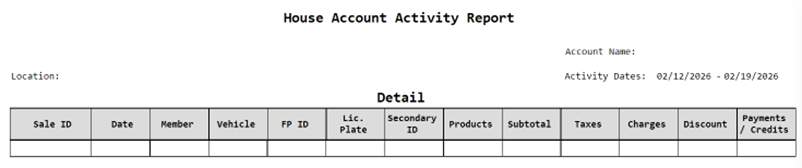
Sale ID
The unique identifier assigned to each sales transaction.
Date
The date when the sale occurred.
Format is mm/dd/yyyy.
Member
The house account holder associated with the account.
Vehicle
The vehicle identifier or description associated with the transaction, if applicable.
FP ID
The Fast Pass ID.
Lic. Plate
The vehicle license plate number recorded for the transaction.
Secondary ID
Any additional identifier or free-form note entered in the House Account Vehicle Editor for the vehicle or customer. This can contain any text such as alternate IDs, internal notes, customer-specific identifiers, and will be shown on the report exactly as entered.
Products
A list or summary of products sold in the transaction.
Subtotal
The sum of product prices before taxes, discounts, and additional charges.
Format is $#,###.##.
Taxes
The total tax amount applied to the transaction.
Format is $#,###.##.
Charges
Any additional fees or surcharges applied to the transaction.
Format is $#,###.##.
Discount
The total discounts applied to the transaction, including promotions or account credits deducted from the subtotal.
Format is $#,###.##.
Payments/Credits
The net amount paid or credited against the transaction, including house account charges, cash/card payments, and applied credits or refunds.
Format is $#,###.##.
Report Footer
The footer of the report includes a Generated By and Generated On, as well as the page numbers.

Generated By
The employee who generated the report.
Generated On
The date and time on which the report was generated, in mm/dd/yyyy and hh:mm:ss format.
Sites
The site(s) for which the report was generated.
Start Time
The start date and time for which the report was generated.
End Time
The end date and time for which the report was generated.