Customers
The Customers panel is where cashier staff can view and edit customer and house account information.
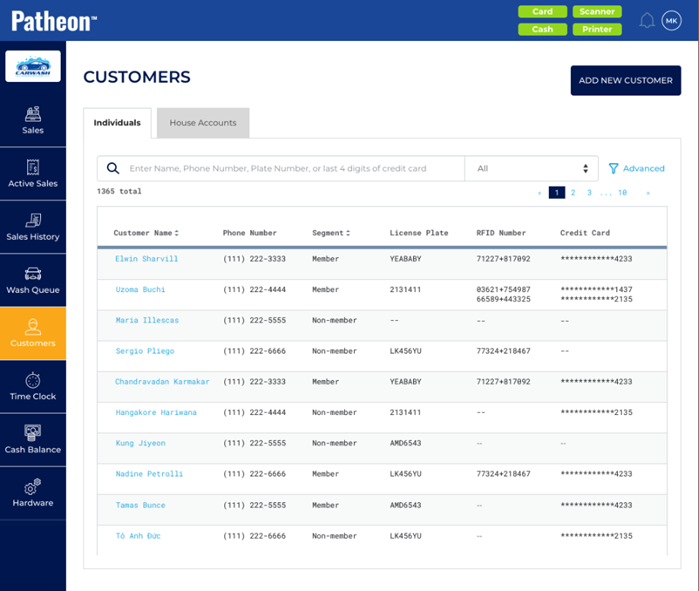
The Customers panel contains an Individuals tab and a House Accounts tab.
Individuals
The Individuals tab allows the cashier to view and edit information related to existing customers, as well as a function to add new customers.
ADD NEW CUSTOMER
Use the function to create and configure a new customer profile.
Search
Use the search tool to find a customer based on Customer Name, Phone Number, License Plate, or last 4 digits of Credit Card. To view all customers after a search, clear this field.
Parameter
The search tool includes a parameter. The default parameter, All, searches Name, Phone, and License Plate; select Name, Phone, or License Plate to restrict search to that parameter.
Advanced Filter
The Advanced filter provides the ability to narrow the list of customers by segment.
Search Results
Search results display dynamically after a term is entered; users don't need to select Enter to submit the search.
If no customers match the search term(s), "0 total" and "No data to display" are displayed. Clear the search field to display all customers.
List
Customer Name
The customer's first name and last name, formatted as a link. Select a customer name to view the Customer Details panel for the customer.
Phone Number
The customer's phone number.
Segment
The segment to which the customer belongs.
License Plate
The license plate recorded for each vehicle assigned to the customer's profile.
RFID Number
The RFID number recorded for each vehicle assigned to a plan for the customer.
Credit Card
The credit card number associated with that customer's account. Only the last 4 digits are visible.
House Accounts
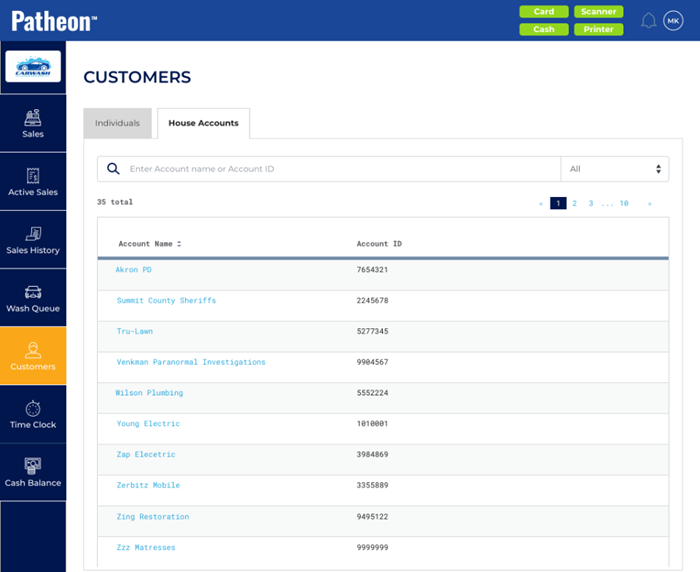
The House Accounts tab allows the cashier to view and edit information related to existing house accounts.
Search
Use the search tool to find a house account based on Account name, or Account ID. To view all house accounts after a search, clear this field.
Parameter
The search tool includes a parameter. The default parameter, All, searches Account name and Account ID.; select Account name or Account ID to restrict search to that parameter.
Search Results
Search results display dynamically after a term is entered; users don't need to select Enter to submit the search.
If no house accounts match the search term(s), "0 total" and "No data to display" are displayed. Clear the search field to display all house accounts.
List
Account Name
The name of the house account.
Account ID
The ID number recorded for the house account.
072022