BILL DISPENSER
The Bill Dispenser diagnostics panel, accessible from the Diagnostics panel, provides status information about the kiosk's bill dispenser, including its 2 bill cassettes. It includes a function to dispense bills from the cassettes.
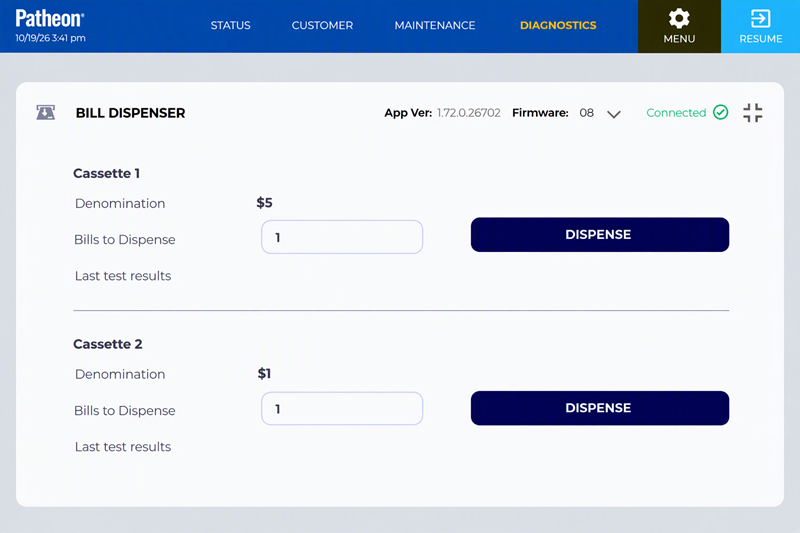
App Ver
Identifies the specific version of the software currently installed and running.
Firmware
Identifies the version of the device's embedded software currently installed and running.
Status
Identifies the current state of the kiosk's bill dispenser. The status color indicates the status type: Normal, Warning, or Critical (Out of Service).
- Connected: The bill dispenser is enabled and online, and communicating successfully with Patheon. The device is available for transactions and is expected to dispense bills normally.
- Degraded: The bill dispenser is enabled and online, but it is operating with reduced performance or has reported a condition that may require attention. Transactions may still be available, but dispensing may be slower, less reliable, or at risk of failing. See below for more information.
- Disconnected: The bill dispenser can't communicate with Patheon and is out of service. Because the system can't confirm the device's current state or send dispensing instructions, bill dispensing is unavailable until connectivity is restored.
- Error: The bill dispenser has encountered a critical error and has been placed out of service. The device can't dispense bills until the error is cleared or the underlying issue is resolved. See below for more information.
- Offline: The bill dispenser is offline and out of service. The device is not currently available for transactions and cannot dispense bills. See below for more information.
Degraded
A Degraded status may be caused by any of these issues:
- A bill cassette is showing as removed. At least one cassette is still present; if all cassettes were removed, it would cause an error. Check the physical connections of the bill cassettes inside the kiosk.
- A bill cassette low sensor has been tripped. Check the contents of the bill cassettes to see if they need to be refilled. Also check the physical connections of the bill cassettes.
- The logical counts for a bill cassette indicates 0 bills remaining or the counts shown on the Bill Dispenser maintenance panel do not match the physical count of bills. Verify the counts shown on the Bill Dispenser maintenance panel match the physical counts of the bills in the cassettes and redo the deposit by performing cash management steps.
Error
An Error status may be caused by any of these issues:
- Hardware fault
- Jam
- Cassette problem
- Failed dispense event
- Sensor issue, or
- Another condition that prevents normal operation.
Offline
An Offline status may occur when the dispenser is:
- powered down
- disabled
- not detected by the kiosk, or
- otherwise unavailable to the system.
The device must be brought back online before bill dispensing can resume.
CASSETTE 1
Select to view information about the kiosk bill cassette 1.
Denomination
The bill type associated with cassette 1. The type of bill configured to be used in the bill dispenser cassette. The bills dispensed from this cassette should match the "Bill type" listed. The bill type is configured based on physical changes made on the actual bill cassette (e.g., magnets in the bill cassette are used to determine the bill type of a cassette on an F-53 bill dispenser).
|
|
 "Bills to dispense" and "DISPENSE" are unavailable if the bill dispenser is disabled or the user does not have vault access.
Bills to dispense
The quantity of bills to dispense from cassette 1 when (see below) is selected.
DISPENSE
Select the function to dispense the number of bills specified in Bills to Dispense (see above) from cassette 1.
Last test results
The bill quantity and bill denomination dispensed for cassette 1.
|
|
It is updated and displayed each time is selected.
CASSETTE 2
Select to view information about the kiosk bill cassette 2.
Denomination
The bill type associated with cassette 2. The type of bill configured to be used in the bill dispenser cassette. The bills dispensed from this cassette should match the "Bill type" listed. The bill type is configured based on physical changes made on the actual bill cassette (e.g., magnets in the bill cassette are used to determine the bill type of a cassette on an F-53 bill dispenser).
Bills to Dispense
The quantity of bills to dispense from cassette 2 when (see below) is selected.
DISPENSE
Select the function to dispense the number of bills specified in Bills to Dispense (see above) from cassette 2.
Last test results
The bill quantity and bill denomination dispensed for cassette 2.
|
|
It is updated and displayed each time is selected.