Customer Details
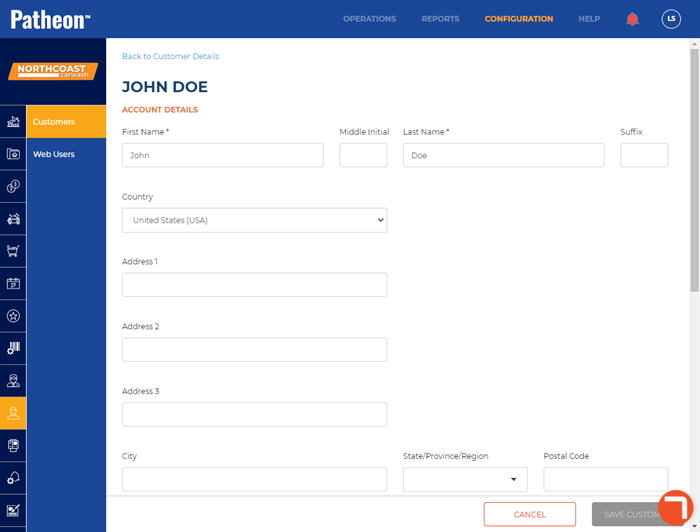
The Edit Customer panel, accessed by selecting the edit icon from the Customer View panel, provides a place to view or edit information for existing customers.
- Add or edit a customer's contact information
- Add or edit a customer's vehicle information
FAQs
- Where do I add a new customer?Where do I add a new customer?
Add new customers from the cashier POS app's Customers panel.
- Where do I delete an existing customer?Where do I delete an existing customer?
Customers can't be deleted from Patheon Portal.
- How many phone numbers can be assigned to a customer?How many phone numbers can be assigned to a customer?
3.
- How many vehicles can be assigned to a customer?How many vehicles can be assigned to a customer?
More than 100.
Account Details
First Name*
Required field
The customer's first name.
Middle Initial
The customer's middle initial.
This field allows entry of 1 alphanumeric character. It will not allow a period to be entered after the initial.
Last Name*
Required field
The customer's last name.
Suffix
A word or string added after the customer's last name to further identify the customer. This is typically Sr., Jr. , II, etc. Allows alpha, numeric, and symbol characters.
Country
The customer's residential address country.
Address 1
The customer's residential address number and street name.
Address 2
The customer's secondary residential address information, for example, an apartment number.
Address 3
The customer's tertiary residential address information, for example, a building name or floor.
City
The customer's residential address city.
State/Province/Region
The customer's residential address state, province, or region. The values in the drop-down are based on the selected Country (see above).
For example, when Country is set to United States (USA), this list contains U.S. states and territories.
Similarly, when Country is set to Canada (CAN), this list contains Canada provinces.
Postal Code
The customer's residential address postal zip code.
The system does not validate postal code length or format.
This customer's email address.
The domain portion must include an at (@) symbol, a period (.), and at least one character after the period. For example:
-
joesmith@mail.com
An Enter a valid email address message is displayed until each of these are entered. The system does not validate entered domains, such as .com, .org, .biz, .net, .gov, etc.
Phone 1*
Valid phone is required
The customer's primary phone number. Multiple phone numbers can be added to a customer (see below). Each phone number includes a country parameter and type parameter.
|
|
 US phone numbers can be 7 digits or 10 digits.
The country associated with the phone number is selected from a drop-down menu. This assigns the international calling code prefix to the phone number, and controls the number of digits that must be entered for the phone number.
|
|
Type
The phone type for the corresponding phone number. There are 3 values:
- Mobile
- Work
- Home
Add Phone Number
Use this function to add additional phone numbers for the customer. Additional phone numbers include country and type settings.
|
|
Additional phone numbers are labeled as:
- Phone 2*
- Phone 3*
Vehicle Details
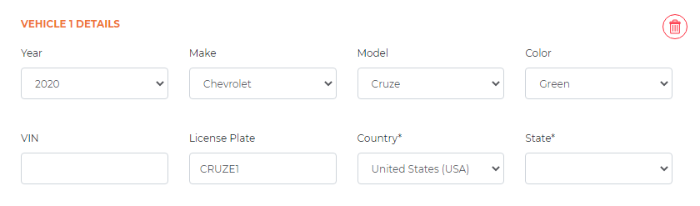
Over 100 vehicles can be assigned to a customer. Each vehicle includes 8 settings: year, make, model, color, VIN, license plate, country, and state. None of these are required, but some are dependent on each other; for example, the selected vehicle make limits the list of vehicle models to that make.
|
|
Year
The vehicle 4-digit year. Select the year from the drop-down list. Available values begin with 1920 and end with the year following the current one.
|
|
Make
The vehicle make. Select the make from the drop-down list.
|
|
Model
The vehicle model. Select the model from the drop-down list. The list of models is based on the selected make. For example, if Make is set to Ford, only Ford vehicles appear in the list of models.
|
|
The selected vehicle Year (see above) does not restrict the list of models to only those manufactured that year. For example, users can add a 2021 Chevrolet Celebrity vehicle (last manufactured for model year 1990).
Color
The vehicle color. Select the color from the drop-down list:
- Red
- Orange
- Green
- Blue
- Purple
- Pink
- White
- Silver
- Black
- Other
VIN
The vehicle's VIN value. A vehicle identification number (VIN) is composed of 17 characters (digits and capital letters) and acts as a unique identifier for the vehicle.
License Plate
The vehicle license plate.
Country
The license plate country.
State
The license plate state.
Use this function to add a vehicle to the customer.
|
|
031121