Customers
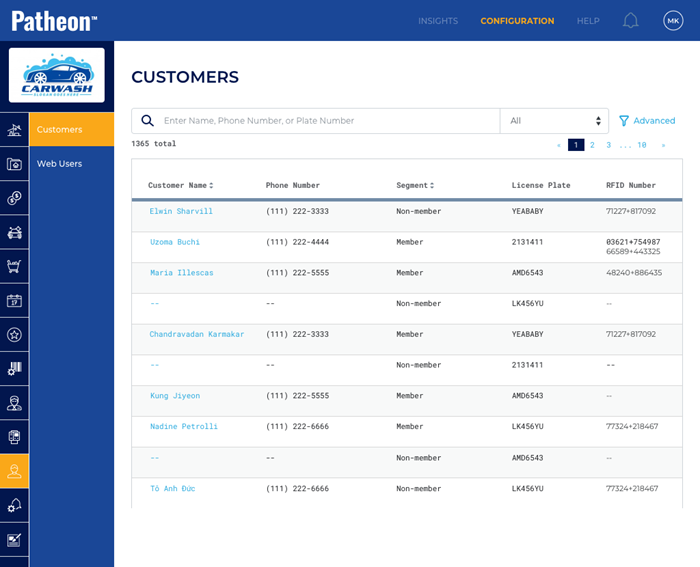
The Customers panel provides a place to view information for existing customers. Individual customers can be selected from here and then viewed in detail and/or edited through the Customer View panel. New customers can't be added here; do that from the Customers cashier panel.
- Select a customer's name to view a list of their transactions in the Customer View panel, as well as details for a specific sale in the Sale ID panel.
FAQs
- Can I create a customer here?Can I create a customer here?
No.
- Can I delete a customer here?Can I delete a customer here?
No.
Search
Use the search function to locate a customer by entering all, or any part of, their Name, Phone Number, or Plate Number. By default, search results will include customers that match any of these. However, the customer search function also includes a drop-down to narrow a search to one of these.
Parameter
The search parameter drop-down list allows users to restrict a search to one of the following parameters: Name, Phone, License Plate, or RFID Number.
Select All, the default value, from the drop-down list to reset the search function.
Advanced Filter
The Advanced filter provides the ability to narrow the list of customers by segment.
Customers List
The customers list provides access to view or edit any customers configured for a client. Select a customer name to open a read-only view of their information, that also includes an edit icon ( ) that can be used to update the customer's information.
The customers list displays 10 customers per page.
|
Column |
Description |
|
Customer Name |
A customer's combined First Name*, Middle Initial, and Last Name*, displayed as a link that provides a read-only view of the customer's information, and access to their sales history. It also includes an edit function that can be selected to update the customer's contact and vehicle information. |
|
Phone Number |
A customer's Phone 1* value. |
|
Segment |
The segment to which the customer belongs. |
|
License Plate |
All License Plate values recorded for a customer. Displays up to 3 license plate values. If a customer has more than 3 vehicles, the VIN column's See More link can be selected to view the rest. |
|
RFID Number |
All RFID values recorded for a customer. Displays up to 3 RFID values. If a customer has more than 3 RFID tags, the VIN column's See More link can be selected to view the rest. |
070623