ROLES & PERMISSIONS
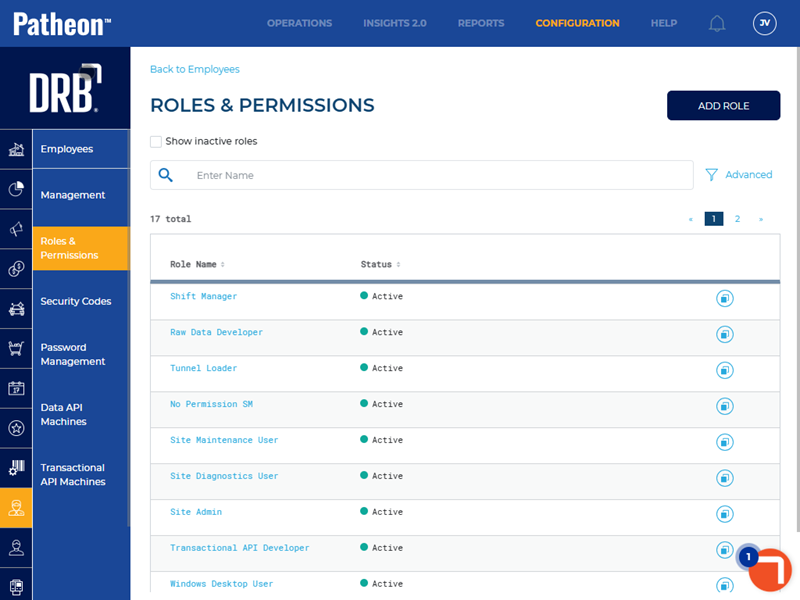
The Roles & Permissions panel provides a view of the available employee roles included with each Patheon system, and the permissions assigned to each role. Multiple roles can be assigned to an employee, however an employee can only sign in to one role (the employee only has the permissions assigned to that role).
- Roles are assigned to an employee in the Roles & Permissions panel, accessible from the Employees panel.
- Site-level permissions only apply to the site for which the corresponding employee role is assigned.
- Employee roles and permissions can be created, edited, deactivated, and reactivated.
Role Hierarchy
Roles are assigned one of five role levels, which determine the permissions an employee can have. Users can only assign roles with a higher level than their own. For example, a user with a level 3 role can assign roles at level 4 or 5.
Level 1
- Raw Data Developer
Level 2
The Nonrestricted Site Manager role is the only role that can assign roles laterally. It can assign itself to others, in addition to assigning role levels 3 through 5.
- Nonrestricted Site Manager
Level 3
- Client Admin
Level 4
The Windows Desktop Admin and Windows Desktop User roles do not have the ability to assign roles.
- Site Admin
- Windows Desktop Admin
- Windows Desktop User
Level 5
Level 5 roles do not have the ability to assign roles.
- Shift Manager
- Vault Maintenance User
- Site Diagnostic User
- Site Employee
- Site Maintenance User
- Tunnel Loader
- Read Only SM
- Custom Role(s)
Permissions
Permissions define which roles can view or access specific features or data in Patheon Portal and on POS terminals and which roles are allowed to make changes. They enforce security and separation of duties, help prevent accidental or unauthorized actions, and make it easier to audit who can perform sensitive operations.
Portal Permissions
Sites & Groups
|
Permission |
Access |
|
|
View: Allows the role to view a site's products in Patheon Portal (Configuration>Sites>Site>Products). Edit: Allows the role to add/edit a site's products in Patheon Portal (Configuration>Sites>Site>Products). *A similar Client Level Products permission is also available. |
|
|
View: Allows the role to view the configuration of each site that belongs to the client. Edit: Allows the role to add/edit the configuration of each site that belongs to the client. |
|
|
View: Allows the role to view site groups. Edit: Allows the role to view, create, and edit site groups. |
|
|
View: Allows the role to view site configuration, including location, contacts, hours, etc., for sites to which the employee is assigned. Edit: Allows the role to add/edit sites to which the employee is assigned. |
|
|
View: Allows the role to view plans (list or detail) assigned to a site in Patheon Portal (Configuration>Plans). Edit: Allows the role to add/edit plan assignment for an assigned site in Patheon Portal (Configuration>Plans). *A similar Client Level Plans permission is also available. |
|
|
View: Allows the role to view hardware (license plate cameras, gates, cashier terminals, kiosk terminals, back office terminals, tunnel entrance terminals, and tunnel controller integration) for sites to which the employee is assigned in Patheon Portal (Configuration>Sites>Site>Site Hardware). Edit: Allows the role to add/edit hardware (license plate cameras, gates, cashier terminals, kiosk terminals, back office terminals, tunnel entrance terminals, and tunnel controller integration) for sites to which the employee is assigned in Patheon Portal (Configuration>Sites>Site>Site Hardware). |
|
|
View: Allows the role to view a site's assigned kiosk workflow in Patheon Portal (Configuration>Sites>Site>Kiosk Management). Edit: Allows the role to add/edit a site's assigned kiosk workflow in Patheon Portal (Configuration>Sites>Site>Kiosk Management). *A similar Configure Client Kiosk permission is also available. |
|
|
View: Allows the role to view a site's cashier terminal layout in Patheon Portal (Configuration>Sites>Site>Point of Sale Management). Edit: Allows the role to edit and publish a site's cashier terminal layout in Patheon Portal (Configuration>Sites>Site>Point of Sale Management). |
|
|
View: Allows the role to view hardware deployments from within Patheon Portal (Configuration>Sites>Site>Site Hardware). Edit: Allows the role to initiate hardware deployments from within Patheon Portal (Configuration>Sites>Site>Site Hardware). |
|
|
View: Allows the role to view a point-of-sale terminal when signing in to the Patheon point-of-sale app Configuration>Sites>Site>Site Hardware). Edit: Allows the role to select a point-of-sale terminal when signing in to the Patheon point-of-sale app Configuration>Sites>Site>Site Hardware). |
Profit Centers
|
Permission |
Access |
|
|
View: Allows the role to view profit centers (list or detail) for sites to which the employee is assigned in Patheon Portal (Configuration>Profit Centers). Edit: Allows the role to add/edit profit centers for sites to which the employee is assigned in Patheon Portal (Configuration>Profit Centers). |
Service
|
Permission |
Access |
|
|
View: Allows the role to view services in Patheon Portal (Configuration>Services). Edit: Allows the role to add/edit services in Patheon Portal (Configuration>Services). |
Product
|
Permission |
Access |
|
|
View: Allows the role to view (list or detail) a client's products (products active at all the client's sites) in Patheon Portal (Configuration>Products). Edit: Allows the role to add/edit a client's products (products active at all the client's sites) in Patheon Portal (Configuration>Products). |
Plan
|
Permission |
Access |
|
|
View: Allows the role to view client-level plans in Patheon Portal (Configuration>Plans). Edit: Allows the role to add/edit client-level plans in Patheon Portal (Configuration>Plans). |
|
|
View: Allows the role to view house accounts in Patheon Portal (Configuration>Plans>House Accounts). Edit: Allows the role to add/edit house accounts in Patheon Portal (Configuration>Plans>House Accounts). |
Discounts
|
Permission |
Access |
|
|
View: Allows the role to view discounts (list or detail) that are active for the site in Patheon Portal (Configuration>Discounts). Edit: Allows the role to add/edit discounts that are active for the site in Patheon Portal (Configuration>Discounts). |
Codes
|
Permission |
Access |
|
|
View: Allows the role to view previously-generated code configurations and download previously-generated codes in Patheon Portal (Configuration>Codes). Edit: Allows the role to edit previously-generated code configurations and generate new codes in Patheon Portal (Configurations>Codes). |
Employees
|
Permission |
Access |
|
|
View: Allows the role to view a site's employees (list or detail) in Patheon Portal (Configuration>Employees) that have access to Patheon Portal. Edit: Allows the role to add/edit a site's employees in Patheon Portal (Configuration>Employees) at the site that has Patheon Portal access. |
|
|
View: Allows the role to view a site's employees (list or detail) that have been deactivated in Patheon Portal (Configuration>Employees) at the site that has Patheon Portal access. Edit: Allows the role to view and deactivate a site's employees in Patheon Portal (Configuration>Employees) at the site that has Patheon Portal access. |
|
|
View: Allows the role to view configured data API clients (list or detail) in Patheon Portal (Configuration>Employees>Data API Machines). Edit: Allows the role to view and edit configured data API clients (list or detail) in Patheon Portal (Configuration>Employees>Data API Machines). |
Customers
|
Permission |
Access |
|
|
View: Allows the role to view the customers panel in Patheon Portal (Configuration>Customers). Edit: Allows the role to view and edit the customers panel in Patheon Portal (Configuration>Customers). |
|
|
View: Allows the role to view whether a customer has notifications enabled in Patheon Portal (Configuration>Customers). Edit: Allows the role to configure customers' notifications settings in Patheon Portal (Configuration>Customers). |
|
|
View: Allows the role to view customers' vehicles in Patheon Portal (Configuration>Customers) Edit: Allows the role to add/edit customers' vehicles in Patheon Portal (Configuration>Customers). |
|
|
View: Allows the role to view customer plan details in Patheon Portal (Configuration>Customers). Edit: Allows the role to add/edit customers' plan details in Patheon Portal (Configuration>Customers). |
|
|
View: Allows the role to view suspended plans in Patheon Portal (Configuration>Customers). Edit: Allows the role to suspended customer plans in Patheon Portal (Configuration>Customers). |
|
|
View: Allows the role to view discontinued plans (list or detail) assigned to a site in Patheon Portal (Configuration>Plans). Edit: Allows the role to add/edit discontinued plans assigned to a site in Patheon Portal (Configuration>Plans). |
|
|
View: Allows the role to view terminated plans in Patheon Portal (Configuration>Plans). Edit: Allows the role to terminate customer plans in Patheon Portal (Configuration>Plans). |
|
|
View: Allows the role to view reactivated customer plans in Patheon Portal (Configuration>Plans). Edit: Allows the role to reactivate customer plans in Patheon Portal (Configuration>Plans). |
|
|
View: Allows the role to view open expiration plans in Patheon Portal (Configuration>Customers). Edit: Allows the role to view and sell open expiration plans in Patheon Portal (Configuration>Customers). |
|
|
View: Allows the role to view issued independent refunds in Patheon Portal (Configuration>Customers). Edit: Allows the role to view and issue independent refunds in Patheon Portal (Configuration>Customers). |
|
|
View: Allows the role to view sent notifications in Patheon Portal (Configuration>Customers). Edit: Allows the role to view and send customer notifications in Patheon Portal (Configuration>Customers). |
|
|
View: Allows the role to view deleted customers in Patheon Portal (Configuration>Customers). Edit: Allows the role to delete customers in Patheon Portal (Configuration>Customers). |
Kiosks
|
Permission |
Access |
|
|
View: Allows the role to view a client's kiosk workflow configuration in Patheon Portal (Configuration>Kiosks>Flows). Edit: Allows the role to add/edit a client's kiosk workflow configuration in Patheon Portal (Configuration>Kiosks>Flows). *A similar Configure Site Kiosk permission is also available. |
Alerts
|
Permission |
Access |
|
|
View: Allows the role view alerts configured in Patheon Portal (Configuration>Alerts>Flows). Edit: Allows the role to view and edit alerts configured in Patheon Portal (Configuration>Alerts>Flows). |
Customization
|
Permission |
Access |
|
|
View: Allows the role to view client-level receipt logo configuration and EWA app configuration (name, logo, image, background image, plan cancellation via app enablement, wash pass terms and conditions, and success modal messaging in Patheon Portal (Configuration>Customization>E-commerce). Edit: Allows the role to add/edit client-level receipt logo configuration and EWA app configuration (name, logo, image, background image, plan cancellation via app enablement, wash pass terms and conditions, and success modal messaging in Patheon Portal (Configuration>Customization>E-commerce). |
|
|
View: Allows the role to view sales security information in Patheon Portal (Configuration>Customization>Sales Security). Edit: Allows the role to view and edit sales security in Patheon Portal (Configuration>Customization>Sales Security). |
|
|
View: Allows the role to view plan sales in Patheon Portal (Configuration>Customization>Plan Sales). Edit: Allows the role to view and edit plan sales in Patheon Portal (Configuration>Customization>Plan Sales). |
Reports
|
Permission |
Access |
|
|
View: Allows the role to view reports in Patheon Portal (Reports). |
|
|
None: The role has no access to security reports. Edit: Allows the role to view all security reports in Patheon Portal (Reports). |
Insights Access
|
Permission |
Access |
|
|
None: The role has no insights access. View: Allows the role to access Insights. (Insights 2.0). |
No Portal permission
|
Permission |
Access |
|
|
None: The role has no access to Patheon Portal. View: Allows the role to access Patheon Portal. |
Others
|
Permission |
Access |
|
|
None: The role has no access to the data API feature test function. View: Allows the role to access the data data API feature test function in Patheon Portal. |
|
|
None: The role has no access to the test transactional API feature. View: Allows the role to access the test transactional API in Patheon Portal. |
Promotions
|
Permission |
Access |
|
|
View: Allows the role to view promotions in Patheon Portal (Configuration>Promotions). Edit: Allows the role to view/add promotions and triggers for the site they are assigned in Patheon Portal (Configuration>Promotions). |
POS Permissions
Sales
|
Permission |
Access |
|
|
None: The role does not have access to sales on POS terminals. Edit: Allows the role to view/edit sales on POS terminals. |
|
|
None: The role does not have access to view/edit open value discounts. Edit: Allows the role to view/apply open value discounts on POS terminals. |
|
|
None: The role does not have access to view or tender a sale. Edit: Allows the role to tender a sale at a POS terminal to a payment card saved to a customer's profile. |
|
|
None: The role does not have access to issue a rewash. Edit: Allows the role to view/issue a rewash. |
|
|
None: The role does not have access to view/issue refunds. Edit: Allows the role to view/issue refunds. |
|
|
None: The role does not have access to open a register. Edit: Allows the role to open a register. |
|
|
None: The role does not have access to modify past day sales. Edit: Allows the role to view/modify past day sales. |
Active Sales
|
Permission |
Access |
|
|
None: The role does not have access to view active sales. Edit: Allows the role to view active sales. |
|
|
None: The role does not have access to send an open sale to queue. Edit:Allows the role to send open sales to the queue. |
Sales History
|
Permission |
Access |
|
|
None: The role does not have access to sales history. View: Allows the role to view sales history. |
|
|
None: The role does not have access to void transactions. Edit: Allows the role to void transactions. |
|
|
None: The role does not have access to re-print claim check receipts. Edit: Allows the role to re-print claim check receipts. |
|
|
None: The role does not have access to re-print purchased gift or prepaid card codes. Edit: Allows the role to re-print purchased gift or prepaid card codes. |
Wash Queue
|
Permission |
Access |
|
|
None: The role does not have access to view/edit the wash queue. View: Allows the role to view the wash queue. Edit: Allows the role to view/edit the wash queue. |
Customers
|
Permission |
Access |
|
|
None: The role does not have access to customer accounts. View: Allows the role to view customer accounts. Edit: Allows the role to view/edit customer accounts. |
|
|
None: The role does not have access to suspend customer plans. Edit: Allows the role to view/suspend customer plans. |
|
|
None: The role does not have access to discontinue customer plans. Edit: Allows the role to view/discontinue customer plans. |
|
|
None: The role does not have access to terminate customer plans. Edit: Allows the role to view/terminate customer plans. |
|
|
None: The role does not have access to reactivate customer plans. Edit: Allows the role to view/discontinue customer plans. |
|
|
None: The role does not have access to delete customers. Edit: Allows the role to delete customers. |
Cash Balance
|
Permission |
Access |
|
|
None: The role does not have access to cash balances. Edit: Allows the role to view cash balances. |
Hardware
|
Permission |
Access |
|
|
None: The role does not have access to view/edit POS hardware. View: Allows the role to view POS hardware configuration. Edit: Allows the role to view/edit POS hardware configuration. |
Kiosk Access
|
Permission |
Access |
|
|
None: The role does not have access to view the kiosk terminal staff screen on a POS terminal. Edit: Allows the role to view/edit the kiosk terminal staff screen on a POS terminal. |
Diagnostics and Maintenance
|
Permission |
Access |
|
|
None: The role does not have access to the kiosk terminal staff screen maintenance panel. Edit: Allows the role access the kiosk terminal staff screen maintenance panel. |
|
|
None: The role does not have access to the kiosk terminal staff screen diagnostic panel. Edit: Allows the role to access the kiosk terminal staff screen diagnostic panel. |
|
|
None: The role does not have access to a kiosk terminal door. Edit: Allows the role to open a kiosk terminal door in order to access its acceptors and dispensers (cassettes and hoppers). It includes all other kiosk terminal maintenance and diagnostic permissions. |
Roles
Patheon provides 17 security roles that can't be edited but can be duplicated and modified, and also allows the creation of custom roles. Each role contains Patheon Portal and POS permission categories.
Patheon Administrator
Client-level administrative role. Manages client settings, products, plans, employees, and notifications.
Portal Permissions
|
Permission |
Access |
|
API Client Credentials |
View |
|
Client Level Plans |
Edit |
|
Client Level Products |
Edit |
|
Configure Site POS |
Edit |
|
Generate Codes |
Edit |
|
Configure Discounts |
Edit |
|
Promotions Access |
Edit |
|
Configure Vehicles |
Edit |
|
Send Notifications |
Edit |
|
Site Level Plans |
Edit |
|
Customer Delete on Portal |
Edit |
|
Configure Customer Notifications |
Edit |
|
View Reports |
View |
|
Access Security Reports |
Edit |
|
Reactivate Plans |
Edit |
|
Configure Client Kiosk |
Edit |
|
Configure Plan Sale Form |
Edit |
|
Configure Profit Centers |
Edit |
|
Configure Specific Sites |
Edit |
|
Configure Site Groups |
Edit |
|
Configure Employees |
Edit |
|
Sell Open Expiration Plans |
Edit |
|
Discontinue Plans |
Edit |
|
Configure Payment Methods |
Edit |
|
Alert Configurations |
Edit |
|
Site Level Products |
Edit |
|
Configure Deployments |
Edit |
|
Custom Roles Access |
Edit |
|
Configure All Sites |
Edit |
|
Terminate Plans |
Edit |
|
Configure Client Services |
Edit |
|
Configure Site Kiosk |
Edit |
|
Suspend Plans |
Edit |
|
Configure House Accounts |
Edit |
|
Site Hardware Configuration |
Edit |
|
Reset Terminal In-Use |
Edit |
|
Customer Tab Access |
Edit |
|
Insights Access |
View |
|
Client Level Customization |
Edit |
|
Deactivate Employees |
Edit |
|
Issue Independent Refund |
Edit |
|
Configure Plan Details |
Edit |
POS Permissions
|
Permission |
Access |
|
Suspend Plans |
Edit |
|
Discontinue Plans |
Edit |
|
Wash Queue Access |
Edit |
|
Sales Access |
Edit |
|
Terminate Plans |
Edit |
|
Open Register |
Edit |
|
Charge Card on File |
Edit |
|
Security Sales |
Edit |
|
Reactivate Plans |
Edit |
|
Void Transactions |
Edit |
|
Print Claim Check |
Edit |
|
Issue Rewash |
Edit |
|
Past Day Sale Modify |
Edit |
|
Sales History Access |
View |
|
Customer Account Access |
Edit |
|
Maintenance Access |
Edit |
|
Open Vault Door |
Edit |
|
Active Sales Access |
Edit |
|
Apply Open Value Discount |
Edit |
|
Staff Screen Access |
Edit |
|
Diagnostics Access |
Edit |
|
Issue Refund |
Edit |
|
Customer Delete on POS |
Edit |
|
Send Open Sale to Queue |
Edit |
|
Hardware Access |
Edit |
|
Cash Balance Access |
Edit |
|
Reprint Purchased Gift or Prepaid Card Code |
Edit |
Client Admin
Manages client-wide products, plans, and site configuration.
Portal Permissions
|
Permission |
Access |
|
API Client Credentials |
View |
|
Client Level Plans |
Edit |
|
Configure Site POS |
Edit |
|
Generate Codes |
Edit |
|
Configure All Sites |
Edit |
|
Configure Vehicles |
Edit |
|
Configure Site Kiosk |
Edit |
|
Site Level Plans |
Edit |
|
Suspend Plans |
Edit |
|
Configure House Accounts |
Edit |
|
Site Hardware Configuration |
Edit |
|
Configure Client Kiosk |
Edit |
|
Configure Plan Sale Form |
Edit |
|
Configure Profit Centers |
Edit |
|
Configure Specific Sites |
Edit |
|
Deactivate Employees |
Edit |
|
Issue Independent Refund |
Edit |
|
Configure Payment Methods |
Edit |
|
Site Level Products |
Edit |
|
Client Level Products |
Edit |
|
Configure Discounts |
Edit |
|
Terminate Plans |
Edit |
|
Configure Client Services |
Edit |
|
Send Notifications |
Edit |
|
Customer Delete on Portal |
Edit |
|
Configure Customer Notifications |
Edit |
|
View Reports |
View |
|
Access Security Reports |
Edit |
|
Reactivate Plans |
Edit |
|
Customer Tab Access |
Edit |
|
Insights Access |
View |
|
Client Level Customization |
Edit |
|
Configure Site Groups |
Edit |
|
Configure Employees |
Edit |
|
Discontinue Plans |
Edit |
|
Configure Plan Details |
Edit |
POS Permissions
|
Permission |
Access |
|
Staff Screen Access |
Edit |
|
Security Sales |
Edit |
|
Past Day Modify |
Edit |
|
Reprint Purchased Gift or Prepaid Card Code |
Edit |
No Permission SM
Variants of Site Manager with no permissions.
Site Employee
Operational site employee with POS responsibilities.
POS Permissions
|
Permission |
Access |
|
Suspend Plans |
Edit |
|
Discontinue Plans |
Edit |
|
Customer Account Access |
Edit |
|
Terminate Plans |
Edit |
|
Open Register |
Edit |
|
Reactivate Plans |
Edit |
|
Cash Balance Access |
Edit |
|
Issue Rewash |
Edit |
|
Sales History Access |
View |
|
Sales Access |
Edit |
|
Active Sales Access |
Edit |
|
Staff Screen Access |
Edit |
|
Send Open Sale to Queue |
Edit |
|
Hardware Access |
View |
Raw Data Developer
Developer role for data APIs and test data access.
Portal Permissions
|
Permission |
Access |
|
Test Data API |
View |
Read Only SM
Read-only site manager variant providing view access to Portal items.
Portal Permissions
|
Permission |
Access |
|
Client Level Products |
View |
|
Configure Client Services |
View |
|
Configure Site Kiosk |
View |
|
Site Level Products |
View |
|
Site Hardware Configuration |
View |
|
Configure Specific Sites |
View |
|
Client Level Plans |
View |
|
Configure Discounts |
View |
|
Configure Employees |
View |
|
Configure Site POS |
View |
|
Configure All Sites |
View |
|
Site Level Plans |
View |
|
View Reports |
View |
|
Customer Tab Access |
View |
|
Configure Site Groups |
View |
|
Configure Client Kiosk |
View |
|
Generate Codes |
View |
Shift Manager
Operational role focused on POS operations and day-to-day sales activities.
Portal Permissions
|
Permission |
Access |
|
Promotions Access |
Edit |
|
Configure House Accounts |
Edit |
POS Permissions
|
Permission |
Access |
|
Suspend Plans |
Edit |
|
Past Day Sale Modify |
Edit |
|
Sales History Access |
View |
|
Customer Account Access |
Edit |
|
Sales Access |
Edit |
|
Active Sales Access |
Edit |
|
Apply Open Value Discount |
Edit |
|
Staff Screen Access |
Edit |
|
Security Sales |
Edit |
|
Customer Delete on POS |
Edit |
|
Send Open Sale to Queue |
Edit |
|
Cash Balance Access |
Edit |
|
Issue Rewash |
Edit |
|
Discontinue Plans |
Edit |
|
Wash Queue Access |
Edit |
|
Terminate Plans |
Edit |
|
Open Register |
Edit |
|
Charge Card on File |
Edit |
|
Issue Refund |
Edit |
|
Reactivate Plans |
Edit |
|
Hardware Access |
Edit |
|
Void Transactions |
Edit |
|
Print Claim Check |
Edit |
|
Reprint Purchased Gift or Prepaid Card Code |
Edit |
Site Admin
Site-level administrator. Manages site configuration, products, plans, hardware, and deployments.
Portal Permissions
|
Permission |
Access |
|
Site Level Products |
Edit |
|
Configure Site POS |
Edit |
|
Generate Codes |
Edit |
|
Terminate Plans |
Edit |
|
Configure Client Services |
View |
|
Send Notifications |
Edit |
|
Customer Delete on Portal |
Edit |
|
Configure Customer Notifications |
Edit |
|
Site Hardware Configuration |
Edit |
|
Customer Tab Access |
Edit |
|
Insights Access |
View |
|
Configure Specific Sites |
Edit |
|
Deactivate Employees |
Edit |
|
Configure Client Kiosk |
View |
|
Discontinue Plans |
Edit |
|
Configure Profit Centers |
View |
|
Client Level Products |
View |
|
Configure Discounts |
Edit |
|
Configure Vehicles |
Edit |
|
Configure Site Kiosk |
Edit |
|
Site Level Plans |
Edit |
|
Suspend Plans |
Edit |
|
Configure House Accounts |
Edit |
|
Reactivate Plans |
Edit |
|
Configure Site Groups |
View |
|
Configure Employees |
Edit |
|
Issue Independent Refund |
Edit |
|
Configure Payment Methods |
Edit |
|
Configure Plan Details |
Edit |
POS Permissions
|
Permission |
Access |
|
Staff Screen Access |
Edit |
|
Hardware Access |
Edit |
|
Diagnostics Access |
Edit |
|
Reprint Purchased Gift or Prepaid Card Code |
Edit |
Site Diagnostics User
Performs diagnostics and troubleshooting on site hardware and kiosk.
POS Permissions
|
Permission |
Access |
|
Staff Screen Access |
Edit |
|
Hardware Access |
Edit |
|
Diagnostics Access |
Edit |
Site Employee
Operational site employee with POS responsibilities.
POS Permissions
|
Permission |
Access |
|
Suspend Plans |
Edit |
|
Discontinue Plans |
Edit |
|
Customer Account Access |
Edit |
|
Terminate Plans |
Edit |
|
Open Register |
Edit |
|
Reactivate Plans |
Edit |
|
Cash Balance Access |
Edit |
|
Issue Rewash |
Edit |
|
Sales History Access |
View |
|
Sales Access |
Edit |
|
Active Sales Access |
Edit |
|
Send Open Sale to Queue |
Edit |
|
Hardware Access |
View |
Site Maintenance User
Maintains POS/kiosk hardware; uses maintenance screens.
POS Permissions
|
Permission |
Access |
|
Maintenance Access |
Edit |
|
Hardware Access |
Edit |
|
Staff Screen Access |
Edit |
Tunnel Loader
Tunnel operational role (wash queue, loaders).
POS Permissions
|
Permission |
Access |
|
Sales History Access |
View |
|
Wash Queue Access |
Edit |
|
Staff Screen Access |
Edit |
|
Customer Account Access |
Edit |
|
Sales Access |
Edit |
|
Hardware Access |
Edit |
Vault Maintenance User
Maintains vaults/cassettes; can open vault doors and perform maintenance.
POS Permissions
|
Permission |
Access |
|
Maintenance Access |
Edit |
|
Staff Screen Access |
Edit |
|
Open Vault Door |
Edit |
|
Diagnostics Access |
Edit |
Windows Desktop Admin
Windows desktop administrative role (POS staff screen admin).
POS Permissions
|
Permission |
Access |
|
Staff Screen Access |
Edit |
Windows Desktop User
Windows desktop user role for POS staff screen.
POS Permissions
|
Permission |
Access |
|
Staff Screen Access |
Edit |
Transactional API Developer
Developer role for transactional API testing.
|
Permission |
Access |
|
Test Transactional API |
View |
Related Topics
- Add a Custom Employee Role
- Deactivate an Employee Role
- Edit Employee Customer Permissions
- Reactivate an Employee Role